Apify vs LocalPipe (2026): scraping local businesses from google maps and finding business owner contact info
Compare Apify and LocalPipe for Google Maps lead scraping, owner matching, verification, and cost-per-prospect.
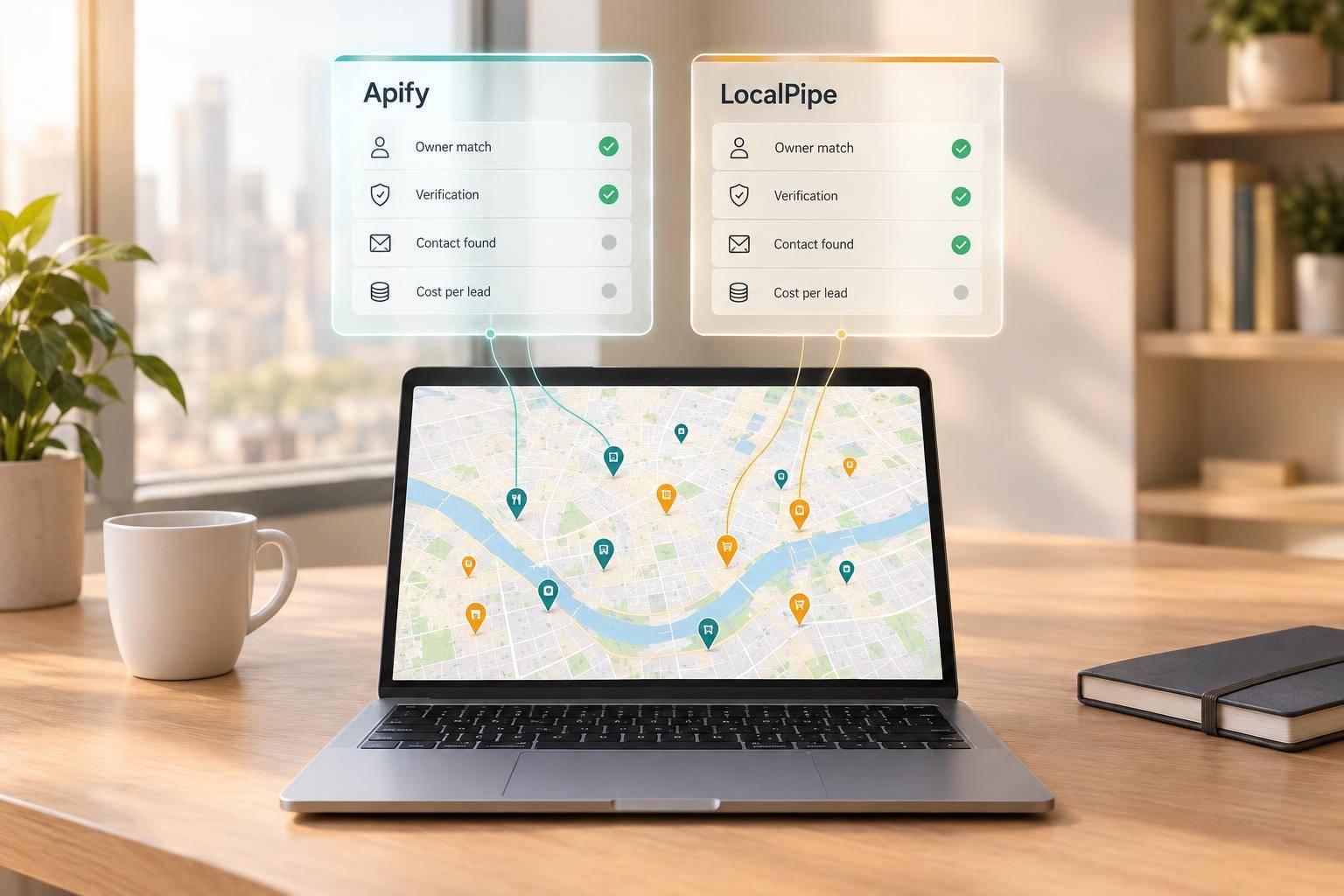
I’d choose Apify for Google Maps business data and test LocalPipe first for named owners and their contact details. Before paying for either, I’d compare the same 50–100 businesses: a listing phone or info@ email does not prove you’ve found the owner.
Apify gives you control over extraction, but owner research usually takes separate tools. LocalPipe combines business search with owner enrichment, with plans listed from $57/month. Its reported 75% owner-name find rate is a vendor claim - not a guarantee of owner emails or direct phones.
### Google Maps scraping tools compared
| What I’d compare | Apify | LocalPipe |
|---|---|---|
| Main output | Business listings and Maps data | Business listings plus owner fields when found |
| Setup | Choose an Actor; add owner research and verification | Search, filter, and request owner contacts |
| Pricing | Actor fees plus any separate enrichment costs | Subscription and pay-on-find credits |
| Delivery | Exports, datasets, and API | CSV, API, webhooks, and Clay |
| Best fit | Custom data collection | Owner-focused outreach lists |
My deciding measure: total cost per usable owner contact, including software, verification, and staff time - not cost per exported row. I’d use the same Dallas roofing sample to check matches, duplicates, and contact quality before scaling.
And I’d keep one rule in view: <u>verified contact data is not consent</u>. Owner identity, email delivery, and outreach permission are separate checks.
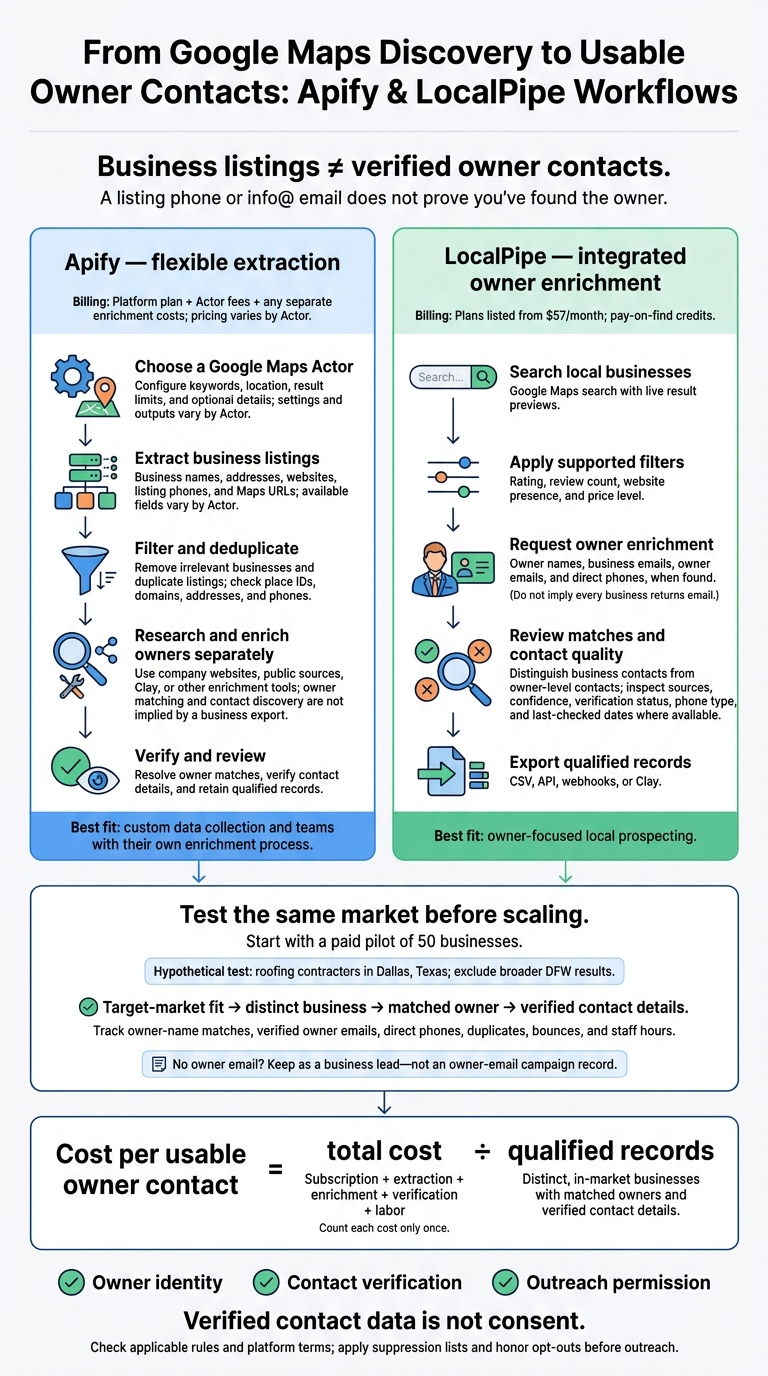
Apify vs LocalPipe: From Google Maps Listings to Owner Contacts
For more lead generation tactics and updates on finding local business owners, check out our latest guides.
2. Apify vs LocalPipe: fields, enrichment, and setup
Apify returns places. LocalPipe returns people attached to those places.
| Capability | Apify | LocalPipe | What the difference means |
|---|---|---|---|
| Maps extraction | Keyword and location searches through a specific Actor; settings and output vary by Actor. | Integrated Google Maps business search with live result previews and filters. | Apify requires choosing and testing an Actor; LocalPipe keeps discovery and enrichment in one workflow. |
| Business fields | Fields vary by Actor: business name, categories, address, phone, website, rating, review count, hours, coordinates, place IDs, photos, and attributes. | Business details plus filters for rating, review count, website presence, and price level. | Check field completeness for prospect qualification and owner matching. |
| Owner contacts | Usually requires separate enrichment. | Owner-name, owner-email, and direct-phone-number fields. | LocalPipe combines owner-contact enrichment with discovery. |
| Verification | Availability varies by Actor or requires a separate service. | Provider describes triple verification. | Assess owner-match evidence separately from email deliverability. |
| Delivery | Actor API, scheduling, and dataset access. | CSV export, HTTP API, webhooks, Clay integration, and recovery panel. | Check how results reach your CRM or enrichment stack. |
| Billing | Pricing varies by Actor; owner enrichment can cost extra. | Pay-on-find credits, charged only for successful enrichments. | Define what counts as a paid result before scaling. |
| Workflow fit | Custom scraping, detailed Maps datasets, and teams with their own enrichment process. | Local-business prospecting that needs named owners and direct contacts. | Choose by output quality, not row count. |
Apify: Maps extraction with separate owner research
Choose an Actor, enter keywords and a location, then set result limits and optional detail collection. Fields vary by Actor, but many workflows offer CSV or JSON exports and dataset access. Save the Actor name, inputs, and run date so you can repeat the run.[7][8][9][10]
Before enriching the list, deduplicate by place ID and check domains, addresses, and phone numbers. Owner research, person matching, and email verification usually require separate steps. A website-contact add-on does not identify the owner. Turn off photos and reviews unless they help qualify prospects.
Apify can build the business list. Turning those businesses into owner-level prospects still takes a separate process.
LocalPipe: Maps search and owner enrichment
LocalPipe’s documented workflow starts with live result previews and filters for rating, review count, website presence, and price level. Keep business emails and owner-level contacts separate when assessing the results.
Its title waterfall supports role-based searches. Owner research draws on business websites, social profiles, BBB listings, and Secretary of State records. LocalPipe also describes CSV exports, an HTTP API, webhooks, and a Clay integration.
Check field-level find rates to see which requested fields returned results. If an integration fails, check the data recovery panel before rerunning enrichment.[3] This workflow makes LocalPipe the more direct fit for building a usable owner-contact list.
Owner matching and email verification claims
LocalPipe reports an owner-name find rate of about 75%, compared with about 30% for DIY Clay workflows. It also describes triple checks - syntax, domain, and mailbox - along with email bounce rates under 1% and pay-on-find billing.[3]
These figures come from the vendor. Ask for the measurement date, sample size, industries, geography, definition of “found,” and verification method. Owner-name coverage is not the same as owner-email or owner-phone coverage.
The next section compares pricing using cost per usable owner contact, rather than cost per raw row.
3. Pricing and cost per usable prospect
Once you’ve checked output quality, compare cost per usable owner contact - not raw row count. Plans and billing models vary, and a cheap export doesn’t always mean a cheap prospect.
LocalPipe plans and pay-on-find credits
LocalPipe charges 1 credit for a business email, 2 for an owner/decision-maker email, and 4 for an owner phone number. Owner-name discovery is included, and credits are billed only for successful finds.[1][3]
| Provider / plan | Monthly subscription | Enrichment billing unit / allowance | Included owner-name finds | Raw export allowance |
|---|---|---|---|---|
| LocalPipe Starter | $57 | 2,000 credits | Up to 1,400 names | 4,000 exports |
| LocalPipe Growth | $97 | 5,000 credits | Up to 3,500 names | 10,000 exports |
| LocalPipe Pro | $157 | 10,000 credits | Up to 7,000 names | 20,000 exports |
| LocalPipe Usage-Based | $97 plus usage | Billing only on successful finds; auto top-ups | Usage-dependent | Usage-dependent |
| Apify Google Maps Actor | Platform plan + Actor fees | Actor-specific per-place billing and optional add-ons | Not included unless the Actor explicitly offers it | Varies by Actor |
The difference matters: raw scraping and owner-level enrichment don’t give you the same prospect data.
Apify Actor fees and added enrichment costs
Apify pricing depends on the Actor, with per-place billing and optional add-ons for details or contact discovery.[11][12][6] Record the exact Actor, the date you checked pricing, the options you enabled, and whether platform usage and proxies are included.
Raw scraping prices don’t include owner-level enrichment. Budget for owner matching, verification, CRM transfer, deduplication, and staff review.
Calculate cost per usable owner contact
Cost per usable owner contact = total cost ÷ qualified records. Include subscription, extraction, enrichment, verification, and labor costs. Count each cost only once.
Define “usable” before testing: a business in your target market, counted only once, with a matched owner and verified contact details.
Test both tools using the same market, search terms, test period, and deduplication rules. Track owner-name matches, verified owner emails, direct phone numbers, duplicates, bounces, and staff hours. Start with a paid pilot of 50 businesses, then manually check the matches before scaling.[3] Compare cost per qualified decision-maker rather than cost per exported row.
The Dallas roofing example next shows how these cost differences play out in practice.
4. Finding Dallas roofing owners: workflows and alternatives
Hypothetical Dallas use case: search roofing contractors in Dallas, Texas, then exclude broader DFW results.
The main difference is where the workflow ends: with business listings or with named owners and verified contacts.
Apify workflow: scrape, research, and verify
Run a Google Maps Actor, then remove roofing-supply stores and duplicate listings. Keep business names, addresses, websites, listing phones, Maps URLs, and service-area details.
Apify requires separate steps to match owners and verify contacts. Crawl company websites, research owners through public sources, and use Clay or another enrichment workflow before exporting records that meet your criteria.
Here’s what each stage delivers - and what you still need to handle.
| Workflow stage | What you get | What still needs manual work |
|---|---|---|
| Apify extraction | Business listings and available website contacts | Configure the Actor, filter results, and research owners |
| Apify + separate enrichment | Owner contacts when matching and enrichment succeed | Select providers, resolve matches, and verify contacts |
| LocalPipe search + enrichment | Business details and requested owner fields when found | Set filters, review matches, and qualify records for export |
LocalPipe workflow: search, enrich, and export
Search the same Dallas market and apply supported filters, such as rating, review count, and website presence. Request owner names, business emails, owner emails, and direct phones. LocalPipe uses live public sources for on-demand enrichment.[3]
Review matches before exporting through CSV, API, webhooks, or Clay. Where available, keep owner-match sources, match confidence, email verification status, phone type, and last-checked dates. A record without an owner email can still serve as a business lead, but it should not enter an owner-email campaign.
Verified data is not consent. Check platform terms, applicable privacy obligations, CAN-SPAM rules for commercial email, and TCPA and Do Not Call requirements for calls or texts. Apply suppression lists and honor opt-outs before outreach. Mailbox verification does not prove ownership or permission to contact someone.
When to use other local lead and B2B tools
If neither Apify nor LocalPipe fits the Dallas roofing search, these tools handle nearby parts of the workflow.
| Tool | Better fit | Owner-contact limitation to test |
|---|---|---|
| Outscraper | Google Maps extraction at scale | Business-level data still needs owner matching and contact validation |
| Scrap.io | Local-business list building | Test whether contacts are owners, employees, or generic business contacts |
| D7 Lead Finder | Local lead discovery | Listing data does not establish owner identity |
| LeadSwift | Local business prospecting | Verify whether person-level fields are current and owner-specific |
| PhantomBuster | Browser automation and workflow orchestration | Automation does not guarantee owner matching |
| Enterprise B2B databases: Apollo, ZoomInfo, Lusha, Seamless.ai, UpLead, and Cognism | Corporate company-and-person targeting | Test local-business coverage, how recently data was checked, and owner titles |
| Email discovery: Hunter | Domain-email discovery and verification | Domain-based emails do not necessarily belong to owners |
| Clay | Provider orchestration and enrichment | Requires provider selection, waterfall logic, verification, and conflict review |
For this Dallas search, raw extraction supplies listings; enrichment adds owner matches and contact details. Clay gives you more control over those steps, while LocalPipe aims to cut the setup work. Before committing, test both on the same Dallas sample and compare match quality, manual review time, and total cost - the tradeoff the next section examines alongside price and usability.
5. Conclusion: choose by the data you need
After comparing fields, enrichment, and cost, choose based on what you need: raw listings or usable owner contacts.
| Your main output | Better fit | Why |
|---|---|---|
| Structured listings, reviews, or custom data workflows | Apify | Provides place fields, review data, datasets, APIs, and workflow integration.[13][6] |
| local prospect lists with owner names, verified owner emails, and direct phones | LocalPipe | Built for owner-level prospecting; verify matches before outreach.[3] |
Run a matched-market pilot using the Dallas roofing workflow above. Test the same category, location, and sample size with both tools. Treat listing phones and info@ emails as business contacts. Count only identity-matched emails or direct phones as owner-level contacts.
Compare cost per usable owner contact: add software, enrichment, verification, and labor costs, then divide by the number of distinct owner contacts that pass your checks. Choose Apify for flexible data collection. Choose LocalPipe for owner-focused prospecting if its accuracy and cost per usable owner contact hold up in your market.
FAQs
How can I distinguish a business owner from a registered agent?
Check the person’s role using official business filings and owner-level enrichment, not just raw listings. Registered agents receive legal documents on a business’s behalf. Owners are the people who make business decisions.
LocalPipe cross-checks live sources, including Secretary of State filings, the Better Business Bureau, and social platforms, to identify owners. Raw listing scrapers like Outscraper and Apify don’t separate these roles, so they may return generic business inboxes instead of verified owner contacts.
How often should I reverify owner contact details?
Recheck owner contact details regularly, especially before starting an outreach campaign with a list that’s been sitting for several months. Contact data gets less accurate over time.
LocalPipe’s triple email verification checks deliverability before delivery. But it doesn’t guarantee that someone still holds the same role or works at the business months later. Repeating enrichment or verification helps keep your list accurate.
How should I handle multiple locations with the same owner?
Keep listing details, business contacts, and verified owner contacts in separate export columns [1]. LocalPipe enriches each listing on demand and typically identifies the same owner across locations when public records name that owner [1][2][3].
With raw scrapers like Apify or Outscraper, manually remove duplicate records before running a separate enrichment pass. That way, you avoid paying for multiple lookups on the same person [4][5].