How to Use LocalPipe to Find Local SEO Clients
A practical LocalPipe workflow for finding local SEO clients: search Fort Worth businesses, segment prospects, enrich owner contacts, and build verified outreach campaigns.
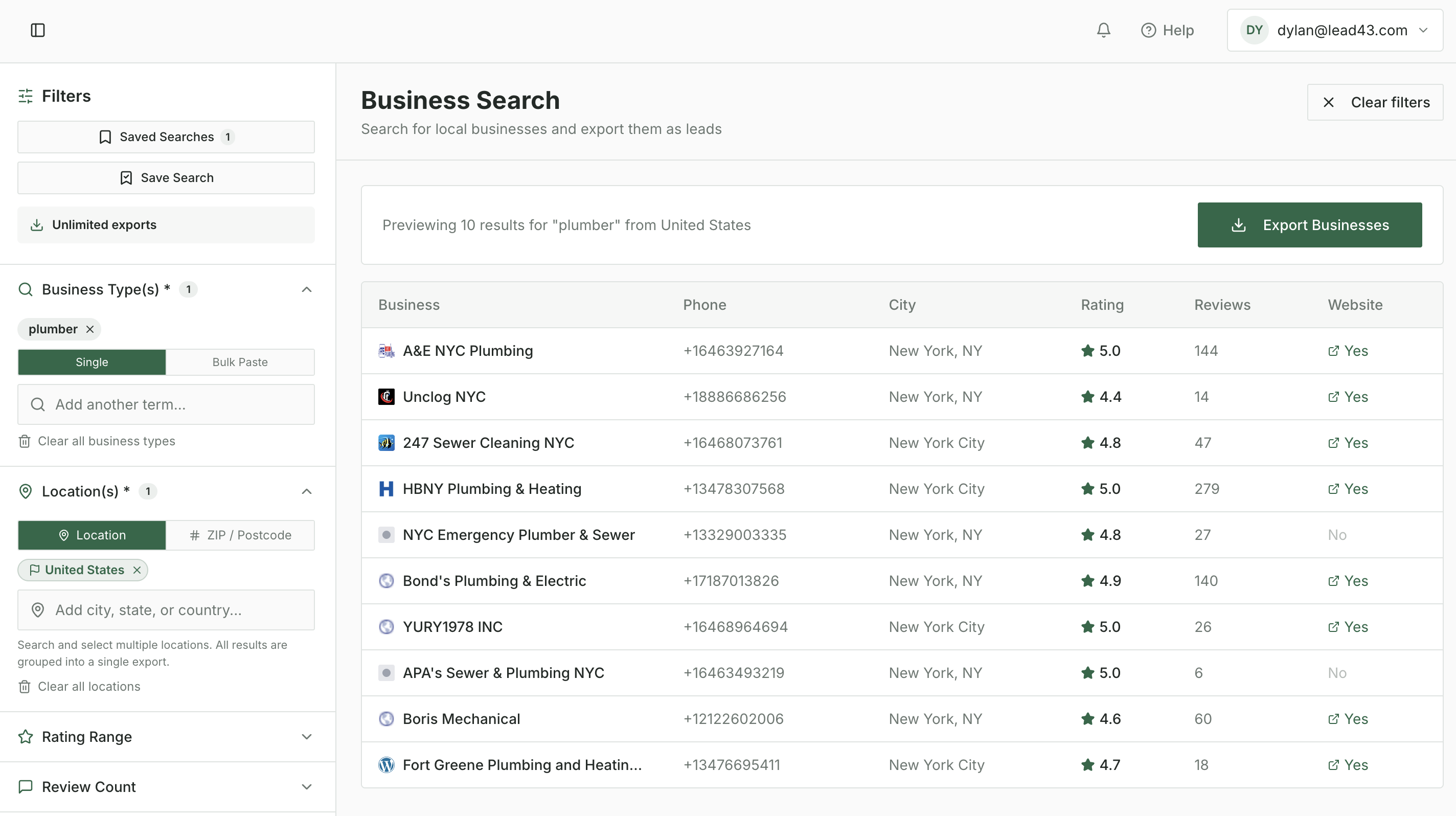
Building a list of local businesses is relatively easy. Deciding which ones deserve a closer look takes more work.
If you sell local SEO, a business name and phone number tell you where to start. You still need to understand whether the company fits your agency, what opportunity you can help with, and who handles the decision.
For this walkthrough, Owen Rechkemmer used LocalPipe to find 884 HVAC and plumbing businesses in and around Fort Worth, Texas. He organized the export into segments, selected 208 businesses with websites and meaningful review activity, and enriched that group for owner and business contact information. The resulting file contains an email address for 102 of those records.
This guide explains the checks to make before contacting anyone, along with practical email, call, and follow-up workflows. The result is a useful starting point for prospecting—not a promise that every business needs SEO.
What LocalPipe data tells you about a prospect
Separate sourcing from qualification. Sourcing identifies businesses in a market. Initial screening helps you decide where to investigate. Qualification requires a closer look at the business and, eventually, a conversation about its needs.
Review count and rating
Review count helps compare the amount of visible customer feedback businesses have accumulated. A company with 15 reviews presents a different starting point from one with 300. Neither number tells you its revenue, marketing budget, or search rankings.
Look at rating alongside the number and content of reviews. A low rating can suggest a reputation issue worth investigating, but it does not establish an SEO problem.
Website presence
A website gives you somewhere to investigate the company's services and online presence. A blank website field means the export did not include a URL, so check the listing and search for the site before calling a business website-less.
Claimed profile status
Keep claimed-status data as a research prompt and verify the Google Business Profile before suggesting help with ownership or management. An exported status alone is not enough to tell a prospect that its profile is unclaimed.
Build a prospect list in LocalPipe
Step 1: Search your industry and location
In Business Search, select the industries you understand and enter a target market. For this campaign, the search used “hvac contractor” and “plumber” in Fort Worth, Texas. LocalPipe also offers filters for rating, review count, website presence, phone availability, price level, and working hours.
Step 2: Export the business list
The search results were exported into a LocalPipe Business List and downloaded as a CSV. The original export contained 884 records, including business names, phone numbers, addresses, ratings, review counts, websites, business types, claimed status, and Google Place IDs.
Keep the original export unchanged and use a separate working spreadsheet for segmentation. That preserves a reference if a later sort, filter, or merge goes wrong.
Step 3: Separate records into useful groups
The first split separated 250 records without a website URL. The remaining 634 records with websites were organized into campaign tabs:
| Segment | Records | What the saved data shows |
|---|---|---|
| Low-review | 356 | Website present; fewer than 50 reviews or missing review count |
| Growth-ready | 208 | Website present; recorded review counts from 50 to 474 |
| Established | 70 | Website present; recorded review counts from 474 to 5,028 |
These labels describe the saved groups; they do not prove that a business wants to invest in SEO. For a new campaign, document your own rules before exporting. For example, keep blank websites and missing review counts in separate research tabs, assign counts below 50 to low-review, 50–499 to a middle group, and 500 or more to a high-review group.
Choose a campaign and investigate the opportunity
The 208-business growth-ready group was selected because its records already had websites and at least 50 reviews. That created a manageable campaign for local SEO research. Other groups can support different offers: low-review companies may need review or local-presence help, while established businesses may have opportunities around additional services or locations.
Check the business before writing the pitch
- Confirm the company serves your target industry and geography.
- Check for closed businesses, irrelevant categories, duplicates, and franchise branches.
- Open the website and Google Business Profile and verify services, locations, and current information.
- Record one specific observation with its source URL and the date checked.
- Connect that observation to something you can actually help with.
Reviews alone cannot answer questions about capacity, priorities, or marketing ownership. Use the first conversation to learn those details.
Enrich the businesses you want to contact
Upload the selected campaign CSV through Enrich Contact Info. Map Business Name to Business Name, Business Website to Website, and Business Location to Address. For this campaign, the selected fields were owner name, owner email, owner phone, and a fallback business email.
Fallback mode looks for a general business email when an owner email is not found. Select only the fields that match your outreach plan; owner phone discovery is useful when calling is part of the campaign, but you do not need every available field.
Review the actual results
| Contact field | Records with a result | Share of 208 |
|---|---|---|
| Owner name | 184 | 88% |
| Owner email | 41 | 20% |
| Owner phone | 12 | 6% |
| Fallback business email | 61 | 29% |
The 41 owner-email records and 61 fallback-email records did not overlap in this file, producing 102 unique email addresses across 102 records, or 49% of the selected campaign. These results describe this run; another industry, market, or list may return different coverage.
Build the finished outreach file
Keep one row per prospect record with business identity, source fields, review context, owner and business contact details, research notes, evidence URL, date checked, offer, verification status, outreach status, and next follow-up.
Use a shared unique identifier when joining enrichment results back to the original export. If one is unavailable, normalize website/domain, business name, and location, then verify every candidate match manually. Never paste columns together by row position after sorting one of the files.
Run outreach around a verified observation
Email the owner
Subject: Quick question about [specific page/service]
Hi [Owner First Name],
I was looking through [Business Name]'s [specific page or listing] and noticed [verified observation]. It looks like there may be an opportunity to improve [specific outcome tied to the observation]. Would it be useful if I sent over a short note showing what I mean?
Use the general business inbox when needed
Ask who handles the website or local marketing and include the specific observation. The goal is to route the message correctly, not to imply that the owner is expecting you.
Follow a simple sequence
| Timing | Channel | Purpose |
|---|---|---|
| Day 1 | Owner email, or business email | Share the verified observation and ask for a small next step |
| Day 3 | Owner phone, or business phone | Confirm whether the topic is relevant |
| Day 7 | Email follow-up | Add one useful detail about the same observation |
| Day 12 | Final email or call | Close the loop and pause outreach |
Stop automated follow-ups when someone replies, declines, asks not to be contacted, or confirms the offer is irrelevant.
Add deeper SEO research when it helps
For a promising prospect, add keyword, traffic, backlink, or local-ranking research from a separate SEO platform. Estimated traffic is still an estimate, and a local ranking check needs a defined query and location. LocalPipe supplies the business and contact data; additional research supports the diagnosis behind a particular offer.
Repeat the workflow in another market
Adapt the process to roofers in Dallas, dentists in Phoenix, or another industry your agency understands. Preserve the raw export, document your screening rules, select a manageable campaign, check the opportunity, enrich only the contacts you need, and keep the research attached to the outreach record.
Search → Export → Segment → Select campaigns → Enrich → Outreach
Create a LocalPipe account and build your first local SEO prospect list.
About the author
Owen Rechkemmer is the founder of Rechkemmer Marketing, an SEO and AI search agency working with local service businesses and B2B software companies. He writes about SEO, AI search visibility, local search, and practical systems for customer acquisition.