8 best practices for building seller outreach lists that reach the actual owner, not the front desk
Verify owners, confirm owner emails and phones, and clean outreach lists to reach decision-makers - not receptionists.
8 best practices for building seller outreach lists that reach the actual owner, not the front desk
I build seller outreach lists around verified owners - not just business listings. Before you contact anyone, confirm who owns the business, check that the email or phone reaches that person, and save the sources and check dates.
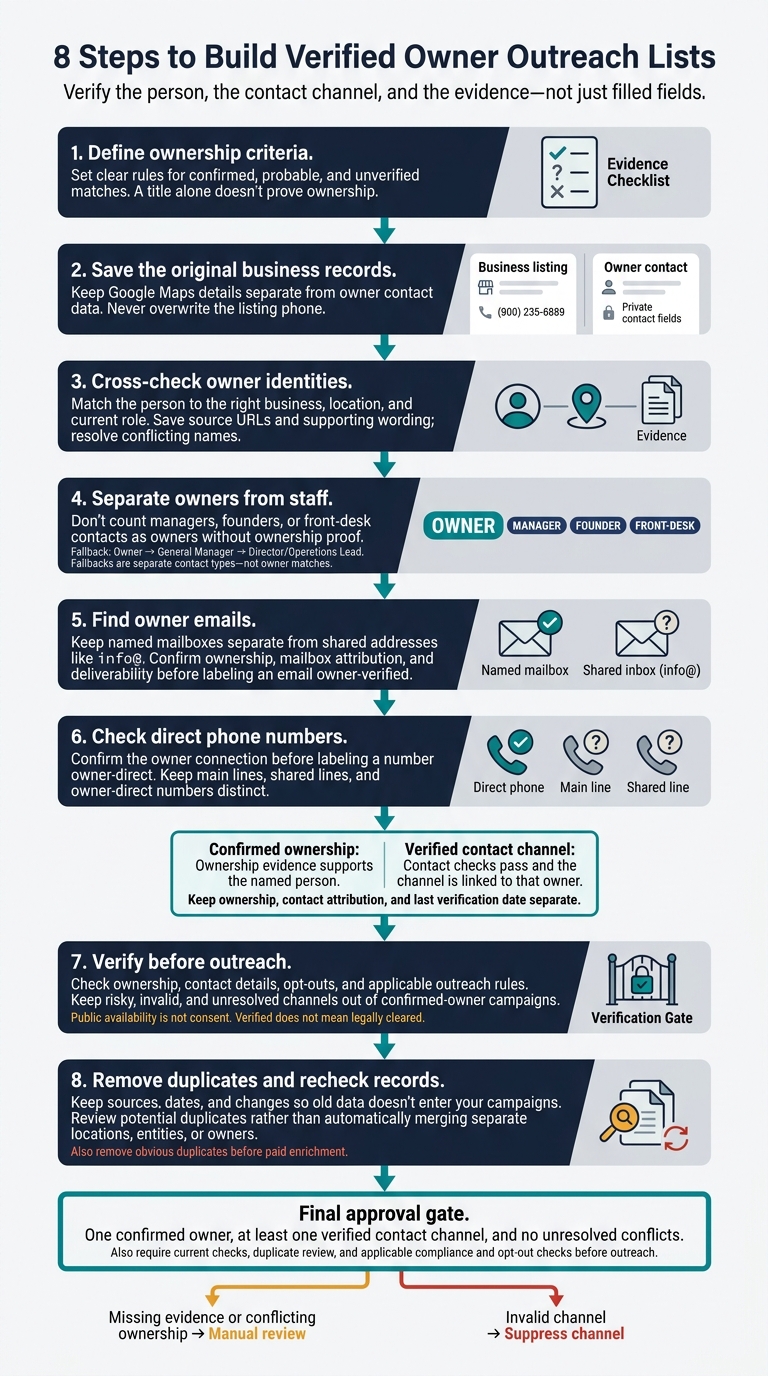
Here’s the eight-step process I use:
- Define ownership criteria. Set clear rules for confirmed, probable, and unverified matches.
- Save the original business records. Keep Google Maps details separate from owner contact data.
- Cross-check owner identities. Match the person to the right business, location, and current role.
- Separate owners from staff. Don’t count managers, founders, or front-desk contacts as owners without ownership proof.
- Find owner emails. Keep named mailboxes separate from shared addresses like
info@. - Check direct phone numbers. Confirm the owner connection before labeling a number owner-direct.
- Verify before outreach. Check ownership, contact details, opt-outs, and applicable outreach rules.
- Remove duplicates and recheck records. Keep sources, dates, and changes so old data doesn’t enter your campaigns.
My rule: <u>one confirmed owner, at least one verified contact channel, and no unresolved conflicts</u>. A filled field is not proof that you’ve reached the right person.
8 Steps to Build Verified Owner Outreach Lists
How I Find Business Owner Cell Numbers (Legally)
sbb-itb-3041e27
What an owner contact record should include
Keep three checks separate: business ownership, contact attribution, and last verification date. Every field should have a source you can trace later.
Start with a record ID that isn’t used elsewhere, business name, legal entity name if known, street address, city, state, ZIP code, website, Google Maps or Business Profile URL, and business category to build local business lead lists faster. Include the person’s full name and documented role, such as co-owner, managing member, president, or another documented decision-maker role. Keep the source’s exact wording. Google Business Profile owner access shows account control - not legal ownership.[2][3]
Store the evidence with each ownership claim: the source URL or filing reference, supporting wording, and whether the ownership link is directly supported or inferred. Give each email address and phone number its own type, source, and attribution status. Separate named email addresses from shared inboxes, and direct phone lines from switchboards. Format U.S. phone numbers with +1 and an area code, and label the phone type only when the source supports it. This helps prevent shared contact details from being treated as owner-only data.
Assign confirmed, probable, possible, or unverified to each field - not just the record as a whole. Store the accessed date and verified date separately in a clear format, such as Oct 24, 2026. Keep the source’s filing or update date when available, too. If the evidence supports ownership but doesn’t establish who uses the phone number, leave the phone unverified and note the next check needed.
1. Define ownership criteria and confidence levels
Use the record fields above to identify the current owner, partner, LLC member, or controlling decision-maker with a financial stake. A title alone doesn’t prove ownership. Founders may no longer hold equity, and executives may simply manage the business.[4]
Set your evidence bar before collecting names. It determines when a possible match is ready for outreach. Confirmed requires explicit ownership proof from state filings or multiple matching public sources. Probable means you have partial signals, such as a name in reviews or on a social profile. Keep unverified records on hold until another source confirms ownership.[4]
Before upgrading a record, check for signs of an ownership change, such as a rewritten About page or a new owner name in review replies. Resolve conflicting names before starting owner-level outreach so weak matches stay off your contact list.[4]
2. Start with traceable Google Maps and business records
Search by category plus city or service area, then apply available filters before adding more data. Prioritize listings with websites for email outreach. Use review counts to decide which businesses to research first - not to exclude those with few reviews. Keep businesses without websites in a separate research queue.[5] Once you have the raw list, confirm which name belongs to the actual owner.
Save the original listing data before enrichment: business name, address, category, website, phone, Maps URL, and Place ID. Put owner names and direct numbers in separate fields. Never overwrite the listing phone.[4]
Outscraper, Apify, and similar tools can build the initial business list, but a scraped listing doesn’t prove owner identity. Even a scraped email may lead to a shared inbox.[1] Treat the list as a research queue, then confirm ownership through public records and other sources.
LocalPipe combines Google Maps discovery with live owner enrichment from websites, filings, BBB, and social profiles. It reports a 75% owner-name find rate, but each match still needs to meet your evidence standard.[1]
Before choosing a provider, run the same 100-row sample through each tool on your shortlist. Measure verified owner-name matches, emails tied to named owners, direct numbers, and source traceability - not just how many fields get filled. Test general B2B tools like Apollo or ZoomInfo only if your target market leans corporate; they’re weaker on local owner data.[4][5] Once you choose your sourcing tools, verify each record before outreach.
3. Confirm owner identities across public sources
Match the owner to the exact business location and role - not just the business name. Cross-check the website, BBB, social profiles, and Secretary of State filings to verify who’s behind each listing.[1]
State filings can link people to business entities, but they don’t prove ownership on their own. Require explicit ownership evidence from at least one other source. Without it, mark the record unconfirmed.[4] Once you identify the owner, distinguish that person from managers and front-desk contacts.
Resolve any conflicting names before approving the record. Save the source URL, the wording that supports the match, and the filing date.
LocalPipe reports about a 75% owner-name find rate, compared with about 30% for DIY Clay workflows.[1] Apply the same evidence standard to both: correct owner matches matter more than filled fields. After confirming identity, move to role separation and direct contact lookup.
4. Distinguish owners from managers and front-desk staff
Once you’ve confirmed that a person is tied to the business, check their role before adding them to your list. Save their title exactly as written, classify their role separately, and record the source. That source might be an About page, team page, footer text, Google Business Profile update, or Secretary of State filing. Use these categories: owner, founder, partner, executive, manager, admin contact, or unknown. Don’t treat “Founder,” “Partner,” or “Director” as proof of ownership. If the source doesn’t support ownership, mark the role as unproven. [5]
| Contact category | Authority | Likely channel | Evidence needed |
|---|---|---|---|
| Owner | Business direction and financial decisions | Owner-specific email or direct number | A source tied to the business confirms ownership |
| Manager / executive | Operations or delegated purchasing | Work email or office extension | A team page or professional bio confirms the role |
| Front desk / admin | Routing and scheduling | Shared inbox or main line | A contact page identifies the role or channel |
| Fallback / unknown | Unverified | Verified business inbox | No named match |
Follow this fallback order: Owner → General Manager → Director/Operations Lead. Each fallback is a separate contact type - not an owner match. [5]
For franchises, label the contact as local franchise owner, hired operator, or corporate contact. A hired operator or corporate brand contact is not a substitute for the local owner. [5]
With the role checked, move to direct owner email lookup.
5. Find owner emails beyond shared inboxes
Confirm the owner’s name and company domain before using an email finder. Match the business website’s About page to a public professional profile. [4]
Once you’ve identified the owner, sort each address by who uses it. In LocalPipe, track owner-direct mailboxes separately from shared inboxes and personal email accounts. [4]
Use Hunter to source and verify emails, Apollo for corporate contacts, and DIY Clay for custom enrichment chains. Gather candidate addresses with these tools, then store each one in the right field. [4]
Put shared inboxes in Business Email and named owner addresses in Candidate Owner Email. Leave Owner Email Status as Unconfirmed until verified. [1]
Mark a mailbox as Confirmed Owner Email only when ownership, mailbox attribution, and deliverability all match. Save the evidence that ties the mailbox to the owner - not just the email checker’s result. [1]
6. Find direct owner numbers and label phone types
After finding emails, check whether a phone number reaches the owner - not the front desk. A Google Maps number isn’t automatically owner-direct. It could reach the owner’s mobile, a receptionist, or a shared line. Cross-check it against the website, social profiles, filings, and trusted databases before labeling it owner-direct. [4]
Label each number as main line, owner-direct, owner mobile, department, or shared business line. Keep the phone type separate from the raw number, and store the country code, source URL, confidence level, and last-checked date. [4]
Only mark a number as owner-direct when you have explicit supporting evidence. A mobile number linked to an owner isn’t automatically a confirmed business contact. Leave it out of outreach unless public evidence supports using it for business contact. After classifying the number, verify it before adding it to outreach. [4]
Outscraper and Apify can extract numbers, but extraction alone doesn’t identify the owner. LocalPipe adds owner names and verified owner phone numbers to listings using live sources. [4] Follow this sequence: extract, classify, verify the owner connection, then conduct outreach. Before reaching out, verify the owner’s name, email, and phone together.
7. Verify ownership and contact details before outreach
Once you’ve found candidate owner emails and direct numbers, make one final check before reaching out. Verify the record, not just the mailbox. Compare the listing with current public sources that support the named owner. Check email syntax, MX records, mailbox status, and catch-all or disposable flags. Date every check, and recheck stale records before outreach. [1][5]
Track ownership and contact status separately. Use verified only when public evidence supports ownership and contact checks pass. Mark catch-all addresses, disposable addresses, or shared inboxes as risky; failed checks as invalid; and missing or conflicting evidence as unresolved. Keep risky, invalid, and unresolved records out of confirmed-owner campaigns to avoid the spam folder. [1][4][5]
Use your enrichment tool only to send approved records into outreach. Its output never replaces owner verification. [4]
Verified doesn’t mean legally cleared - or guaranteed to arrive. Check CAN-SPAM, TCPA, and Do Not Call rules before calling or texting, and honor opt-outs across all channels. Public availability is not consent. [1][4][5] Pass only verified records into deduplication and campaign launch.
8. Remove duplicates and keep sources and check dates
After verification, remove duplicate records so the same owner doesn’t receive repeated outreach.
Check multiple fields - not just the business name - so one owner doesn’t become several leads. Keep the original values as you normalize names, standardize phone numbers, and split street addresses into parts. Compare domains, owner names, and Place IDs, using Place IDs to anchor each location.
A match should trigger a review, not an automatic merge. Matching phone numbers and street addresses are stronger signs of a duplicate. Don’t merge separate locations, legal entities, or owners. Remove duplicates before paid lead enrichment so you don’t pay to process the same record twice. The goal is one owner, one location, and one outreach record. [5]
When merging records, keep the source URLs for every retained field, whether they come from Google Maps, the official website, Facebook, Instagram, BBB, or Secretary of State filings. Save the initial retrieval date and a separate last-checked date for each email address and phone number. [1]
Recheck outdated lists before outreach, then update active segments quarterly. Use only current records for outreach. [1][5]
Contact record fields and recheck checklist
After verification and deduplication, store each lead in a schema that separates ownership, contact status, and check dates. Confirmed describes ownership evidence. Verified describes a contact channel that passed checks and is linked to the named owner. Use Risky for shared inboxes or catch-alls, Invalid for failed checks, and Unresolved for conflicts or missing evidence.
A registered agent, officer, or founder isn’t automatically the current owner. Keep the source-stated title exactly as written.
Use the schema below to keep main phone lines and shared inboxes out of owner-level outreach.
| Field | Accepted values or format | Recheck timing |
|---|---|---|
| Business identity | Stable record ID; legal/public name; separate DBA; full U.S. address; Maps URL; domain | At collection; after location, branding, or domain changes |
| Owner name and exact role | Full name; source-stated title such as Owner, Co-owner, Founder, Member, or Managing partner |
Before each campaign; after role changes |
| Ownership confidence | Confirmed, Probable, Unverified; supporting identifiers and evidence |
When new evidence conflicts |
| Owner and business emails | Separate owner_email and business_email; type: named_owner, role_based, shared_inbox, unknown |
Before outreach; after a bounce |
| Phone numbers and types | U.S. E.164: +1XXXXXXXXXX; owner_direct, owner_mobile, business_main, front_desk, voicemail, unknown |
Before calling; after failed calls |
| Contact status, per channel | Verified, Risky, Invalid, Unresolved; reason |
Before outreach and after bounce or call results |
| Evidence and dates | Source URL/type; collection and source-observed dates; separate owner, email, phone, and address check dates in YYYY-MM-DD format |
At collection and each field check |
| Related records | canonical ID; branch/parent IDs; duplicate IDs; keep/merge/do_not_merge | During imports and review |
| Review notes and history | Old/new values; source; date; reviewer; reason | After corrections, conflicts, or merges |
Valid email syntax alone doesn’t verify mailbox deliverability or a connection to the owner, and failing to verify these can lead to getting blacklisted.
Before each campaign, recheck:
- Business operating status and address/domain match.
- The owner’s current role and any conflicting evidence.
- Whether emails and phone numbers reach the owner, a shared inbox, or the front desk.
- Opt-outs and do-not-contact history.
Send uncertain owner matches to manual review. Suppress invalid channels even when other fields are verified.
Mark a channel Invalid after a hard bounce or a disconnected number. Mark affected claims Unresolved after an ownership dispute, relocation, or domain change.
Review risky or high-value records monthly, probable matches quarterly, and confirmed identity fields every 6 to 12 months - and before each campaign. Log the triggers and results in a change log, and retain conflicting observations.
Conclusion: Prioritize verified owners over list size
A smaller list of verified owners beats a larger list of shared inboxes and contacts linked to the wrong business.
Test list quality before scaling[5], and choose your tool based on your target: LocalPipe for local-owner enrichment, or Apollo or ZoomInfo for corporate lists.[1]
Send only records that have the correct business match, evidence of ownership, at least one verified owner contact channel, up-to-date checks, and no duplicate conflicts. Each record also needs a final CAN-SPAM and opt-out check. Keep uncertain matches in review to protect deliverability and keep the sending queue clean.
FAQs
How do I verify ownership when public records are incomplete?
Match the business to its legal entity using its address and phone number. Check Secretary of State filings, DBA records, or licensing boards. Then cross-check the owner’s identity against company websites or social media bios. Registered agents and officers aren’t always owners.
If sources conflict or you can’t verify ownership, mark the record unconfirmed. For each ownership claim, save the source, verification date, and a note explaining your confidence in the claim.
How should I handle outreach to co-owners?
Treat each co-owner as a separate outreach candidate. Use Secretary of State filings, DBA records, or licensing documents to confirm ownership - not just a role as a manager or registered agent. Keep a separate record for each person, with the source and verification date.
If you can’t confirm which co-owner makes the final decision, prioritize contacts by confidence score and address them by name when appropriate.
How can I measure my owner outreach list’s accuracy?
Test 50–100 rows. Confirm owner names using current, documented evidence, not just matching business listings. Track identity confidence separately from email deliverability, and exclude risky, catch-all, or unknown email addresses.
Measure coverage by dividing usable owner contacts by total rows: 40 usable contacts out of 100 rows = 40%.
Record sources and verification dates, remove duplicates, and re-verify regularly. When comparing LocalPipe with raw scrapers, separate correct business listings from correct owner contacts - they’re not the same thing.