Leadswift vs LocalPipe (2026): scraping local businesses and local business owner contact info enrichment direct comparison
Compare LeadSwift and LocalPipe for finding verified local business owners: owner-name yield, verification, pricing, and exports.
I’d choose LeadSwift for local lead searches plus email outreach, and LocalPipe for finding owners and their contact details. Before paying, I’d test the same 100 U.S. businesses in both tools and compare the cost per verified owner contact - not the number of listings.
LocalPipe reports a 76% owner-name find rate in a 500-business test, but that wasn’t a head-to-head test against LeadSwift. Neither a listing nor a general business email proves you can reach the owner.
Quick Comparison - November 9, 2026
| What I’d compare | LeadSwift | LocalPipe |
|---|---|---|
| Main job | Local prospecting and built-in email outreach | Live business search and owner enrichment |
| Data sources | Exact source mix unconfirmed | Maps, websites, social profiles, BBB, state filings, and Yelp |
| Owner contacts | Advertises owner and employee contacts; owner yield unconfirmed | Owner names, verified emails, and direct phones where found |
| Starting price | $19.99/month; confirm billing terms | $57/month for 2,000 reported credits |
| Usage model | Daily search limits | Credits charged for successful finds |
| Exports and automation | Unlimited exports advertised; API access unconfirmed | CSV, REST API, webhooks, and Clay integration |
My rule: <u>count only contacts that meet your outreach needs</u>. Include verification, cleanup, and workflow costs - not just the subscription.
I’d also weigh raw listing tools, corporate contact databases, Hunter, or a Clay vs Apollo comparison or a DIY Clay workflow if owner enrichment isn’t the main task. The comparison below covers sources, filters, contact checks, pricing, exports, and handoffs so you can choose based on what you’ll actually use.
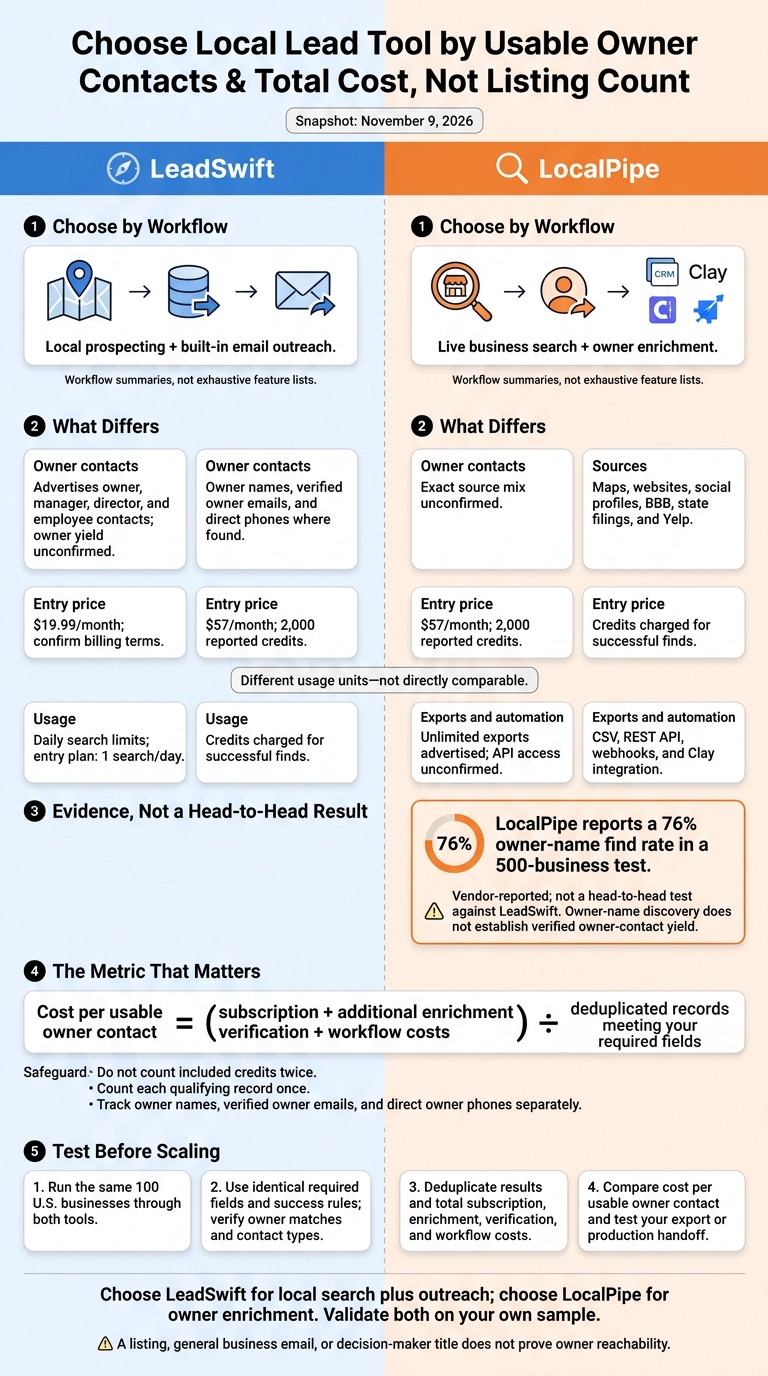
LeadSwift vs LocalPipe: Choose by Usable Owner Contacts
LeadSwift vs LocalPipe: Data and Features
LeadSwift combines prospecting and outreach. LocalPipe focuses on local business owner enrichment. To compare them, test what each returns for the same business sample.
| Area | LeadSwift | LocalPipe |
|---|---|---|
| Primary use | Local prospecting, enrichment, list management, and email outreach. | Live local business search and owner enrichment. |
| Sources | Business and individual contact data; exact source mix unconfirmed. | Google Maps, websites, social profiles, BBB, state filings, and Yelp. |
| Google Maps coverage | Exact coverage unconfirmed. | Supports Google Maps listings globally; strongest reported owner-find coverage in the U.S.[2] |
| Search filters | Industry/category and location. | Business type, location, rating, review count, website presence, and price level; live previews. |
| Live collection | Update timing and collection method unconfirmed. | Searches and enriches live on demand. |
| Business fields | Emails, phones, websites, social profiles, and additional business data. | Name, website, business email, location, and phone. |
| Owner fields | Advertises owner, manager, director, and employee contacts. | Owner name, verified owner email, and direct phone where found. |
| Verification and find rates | Comparable owner-contact rates and verification method unconfirmed. | Vendor benchmark: 76% owner-name find rate across 500 businesses.[1] Reports triple email verification; users report campaign bounce rates below 1%.[3] |
| Limits and failed-result billing | Daily search allowances may apply; success-only billing unconfirmed. | Plan-based credits and export allowances; credits consumed only on successful finds.[3] |
| Exports and automation | Unlimited exports advertised; API, webhooks, and native Clay support unconfirmed. | CSV exports, REST API, webhook callbacks, and Clay integration. |
| Outreach | Built-in email outreach. | Handoff to a CRM, Clay, or a separate outreach tool. |
The choice comes down to whether you want prospecting and outreach in one platform or a separate tool for finding owner contacts.
LeadSwift: Local Search and Outreach
LeadSwift advertises list uploads, sender rotation, sequences, A/B testing, and AI personalization alongside contact enrichment.[4][5] Check role labels carefully: a manager or director title does not prove ownership.
| Area | Strength | Qualification |
|---|---|---|
| Search volume | Supports local industry-and-location prospecting and advertises large or unlimited lead storage. | Daily search allowances may still apply. |
| Exports | Advertises unlimited exports. | Confirm file formats, column customization, and plan-specific limits. |
| Owner identification | Advertises owner, manager, director, and other employee contacts. | Test source attribution, owner-contact yield, and verification. |
| Pricing | Subscription includes outreach and contact features. | Compare subscription cost with the number of verified owner contacts obtained. |
LocalPipe: Live Search and Owner Enrichment
LocalPipe pulls owner data from websites, social profiles, BBB, Secretary of State filings, and Yelp. Its waterfall can fall back to another decision-maker, so keep the returned title rather than relabeling that contact as an owner.[2]
Exports, APIs, and CRM Handoffs
| Capability | LeadSwift | LocalPipe |
|---|---|---|
| CSV and fields | Unlimited exports advertised; confirm the export schema. | CSV includes Name, Website, Owner Name, Owner Email, Business Email, City, Zip, Phone, Mobile, and additional fields.[3] |
| API and limits | Access, rate limits, and plan eligibility unconfirmed. | REST API included on listed plans; request-rate and concurrency limits unconfirmed. |
| Webhooks and Clay | Native support unconfirmed. | Webhook callbacks, Clay integration, and a Clay template. |
| Monitoring and recovery | Confirm usage logs and failed-call recovery. | Live usage logs and a recovery panel for results from failed API or Clay calls.[2][3] |
| Outreach handoff | Built-in email outreach features. | CSV or API handoff; native CRM connectors unconfirmed. |
Keep one stable business ID, use separate business and owner columns, and deduplicate by place ID or domain. For API or Clay jobs, log credits, failures, and retries separately so you can compare the cost per usable owner contact.
Pricing and Cost per Usable Owner Contact
With the feature differences clear, compare what each tool costs per usable owner contact.
Look beyond the monthly price: LeadSwift charges for daily searches, while LocalPipe uses credits only for successful enrichments.[2][4]
LeadSwift Pricing and Daily Search Limits
| Tier | Reported price in USD | Daily searches |
|---|---|---|
| Tier 1 | $19.99/month | 1/day |
| Tier 2 | $39.99/month | 5/day |
| Tier 3 | $79.99/month | 20/day |
LeadSwift’s official pricing page lists these three plans.[4] Check whether the listed rates require monthly or annual billing. LeadSwift charges by search query, not by returned contact, so daily search limits don’t tell you how many owner contacts you’ll get.[7]
LocalPipe Pricing and Credit Usage
When comparing LocalPipe’s plans, keep business-record costs separate from owner-contact costs.
| Plan | Base price in USD | Reported credits / usage |
|---|---|---|
| Starter | $57/month | 2,000 credits |
| Growth | $97/month | 5,000 credits |
| Pro | $157/month | 10,000 credits |
| Usage-Based | $97/month + usage | Unlimited enrichment volume; auto top-ups |
LocalPipe offers fixed plans at $57, $97, and $157 per month, plus a usage-based option starting at $97/month.[6] The fixed-plan credit amounts are reported allowances, not guarantees.[2][3] Unused fixed-plan credits roll over indefinitely.[2][3]
A business email costs 1 credit. An owner or decision-maker email costs 2 credits, including the owner-name lookup.[2] Check the phone lookup credit rate before building a calling workflow. You can also follow this guide to find business owner phone numbers more efficiently.
How to Calculate Cost per Usable Contact
Cost per usable owner contact = (subscription + additional enrichment + verification + workflow costs) ÷ deduplicated records meeting your required fields.
Don’t count included credits twice. Count each record only once, and only if it meets your outreach requirements. Track owner names, verified owner emails, and direct owner phones separately.
Use your test results to see which produces the cheaper usable list: LeadSwift with its lower entry price, or LocalPipe with its owner-contact yield.
If neither pricing model fits your workflow, compare the alternative local lead tools next.
When to Choose Other Local Lead Tools
Choose these tools when you need raw listings, reviews, or custom extraction rather than outreach-ready owner contacts. They cover workflows that neither LeadSwift nor LocalPipe may fit.
LeadSwift and LocalPipe serve as reference points; they aren’t alternatives listed in the table. The tools below fall into three groups: raw listing tools, corporate databases, and custom enrichment workflows. Listing phone numbers and website emails don’t necessarily reach an owner. “Owner coverage unverified” means coverage hasn’t been established - not that it’s absent.
| Tool | Maps search | Listing exports | Owner identification | Owner/contact output | Verification | Automation | Pricing model | Best-fit use case |
|---|---|---|---|---|---|---|---|---|
| Outscraper | Yes | Yes | Separate workflow | Business contacts vary by workflow; owner enrichment separate | Separate workflow | API | Usage-dependent | Raw listings, reviews, and research |
| Apify | Actor-dependent | Actor outputs | Separate workflow | Provider-dependent | Workflow-dependent | Actors and custom workflows | Task- and compute-dependent | Developer-controlled extraction |
| Scrap.io | Yes | Yes | Separate workflow | Business contacts; owner coverage unverified | Separate workflow | Plan-dependent | Plan-dependent | Bulk Maps exports |
| PhantomBuster | Workflow-dependent | Workflow outputs | Separate workflow | Workflow-dependent | Workflow-dependent | Broader automation workflows | Plan- and workflow-dependent | Multistep automation |
| D7 Lead Finder | Local business search | Lead exports | Owner coverage unverified | Business contacts; owner coverage must be verified | Separate validation may be needed | Search-based workflows | Plan- and search-limit-dependent | Local business list building |
| Apollo, ZoomInfo, Lusha, Seamless.ai, UpLead, Cognism | Not Maps search | Contact/company exports | Owner coverage unverified | Person-level contacts; local coverage varies | Provider- and field-dependent | CRM/API options vary | Seats, credits, contracts, or quotes | Corporate B2B targeting |
| Hunter | Domain-based, not Maps search | Email-result exports | Requires owner identity first | Domain emails; ownership not established | Email verification | API/workflow component | Credits and plan limits | Email discovery after domain lookup |
| DIY Clay | Source-dependent | Workflow outputs | Provider-dependent | Provider-dependent | Configurable verification steps | Custom waterfalls | Clay and provider usage | Custom enrichment logic |
Local Listing Tools: Outscraper, Apify, Scrap.io, PhantomBuster, and D7 Lead Finder
Use Outscraper or Apify for raw Maps data and custom extraction. Scrap.io fits bulk Maps exports, D7 Lead Finder handles local lead searches, and PhantomBuster supports broader automation. You can compare these Google Maps scraping tools to see which fits your specific outreach needs. Before adding another provider, check what enrichment each tool already offers.
B2B Contact Tools and Hunter
Corporate prospecting shifts the task from finding owners to finding specific people. Apollo, ZoomInfo, Lusha, Seamless.ai, UpLead, and Cognism fit that task, rather than local owner discovery.[10]
Hunter comes after domain discovery. It finds and verifies domain-based emails, but it doesn’t establish who owns the business.[8][9] An info@ result is still a business inbox - not proof of an owner contact.
DIY Clay Workflows vs LocalPipe
Choose DIY Clay only when custom waterfalls and field mapping are worth the setup compared with a purpose-built local enrichment flow. When calculating cost per usable owner contact, include provider charges, verification, and maintenance.
LocalPipe offers a focused local-business workflow and a Clay integration. It reports roughly a 75% owner-name find rate versus 30% for DIY Clay. That comparison is vendor-reported and non-controlled, so treat it as directional, not a result every user should expect.[3]
Test the claim with a blinded sample of at least 100 identical businesses. Match the inputs and success rules, then track owner-name accuracy, verified contact yield, duplicates, and total spend.
Conclusion: Choose by Contact Yield and Total Cost
Choose based on usable owner contacts and total cost - not listing count.
| Choose | When your priority is |
|---|---|
| LeadSwift | Local search and outreach at a fixed monthly price |
| LocalPipe | Finding named owners and adding verified direct-contact details, with credits charged only for successful results |
| Raw scrapers for listings only | Business listings for research or a separate enrichment pipeline (or scrape Google Maps directly) |
| Enterprise databases for corporate contacts | Corporate and enterprise contacts rather than local owner discovery |
| DIY Clay vs manual enrichment | Custom workflows that combine multiple sources |
If two options look close, use a small sample test to break the tie.
Test a Small Sample Before Scaling
Run the same small set of businesses through both tools. Check the owner match, email type, and whether the phone number reaches the intended contact.[2] Before scaling, test the export or handoff you’ll use in production.
FAQs
How can I verify a contact is the actual business owner?
Check the contact’s name against Secretary of State filings, BBB profiles, the official business website, or the business’s social media profiles. LocalPipe searches these live sources automatically to identify owners.
Look for match-confidence indicators and last-checked dates. Email validation confirms deliverability, not ownership. Separate generic business inboxes from owner-specific contacts. If you’re unsure, manually check the owner’s name against public business records.
What outreach rules apply to scraped owner contacts?
Use scraped owner contacts soon after validation. Validation confirms that an email address is deliverable at the time of lookup - not that the person still holds the same role. Letting lists sit for months can increase bounce rates [1].
Keep business-level emails, such as info@ or contact@, separate from verified owner-specific emails. General business inboxes often reach receptionists rather than decision-makers, making them less effective for direct owner outreach [1][2].
How often should I refresh my local lead lists?
Update your local lead lists periodically, especially if they’ve sat unused for months. Email validation checks deliverability only at the time of verification. It doesn’t confirm whether someone still works at the business or whether their contact details are still accurate [1].
LocalPipe enriches data live, on demand, instead of relying on static, cached records. Running a new search provides the most current owner identification and contact data available at the time of outreach [2][3].