How to scrape Google Maps in 2026
Workflow to collect, clean, and enrich Google Maps business listings—tools, Places API limits, dedupe, and compliance checks.

Start with business listings - not owner contacts. For a search like “dentists in Austin, TX,” collect available names, addresses, public phone numbers, websites, ratings, and review counts. Then remove duplicates, export the list, and add owner contacts separately.
The workflow has three parts:
- Choose a collection method: Compare Google Maps scraping tools such as Outscraper, Apify, and LocalPipe. Review Google’s terms before collecting data; paying for a scraper does not grant permission to reuse it. The Places API serves app integrations and has storage limits.
- Run targeted searches: Split searches by neighborhood and specialty, record search dates, and check coverage. Maps results are not a complete business directory.
- Clean and check the export: Keep missing fields blank, preserve source links, and spot-check 20–25 rows. Verify owner roles and email details before outreach, using a guide to find the owner of a local business, then review privacy and email rules.
A business listing is not a verified owner contact. Keep those data types separate throughout the process.
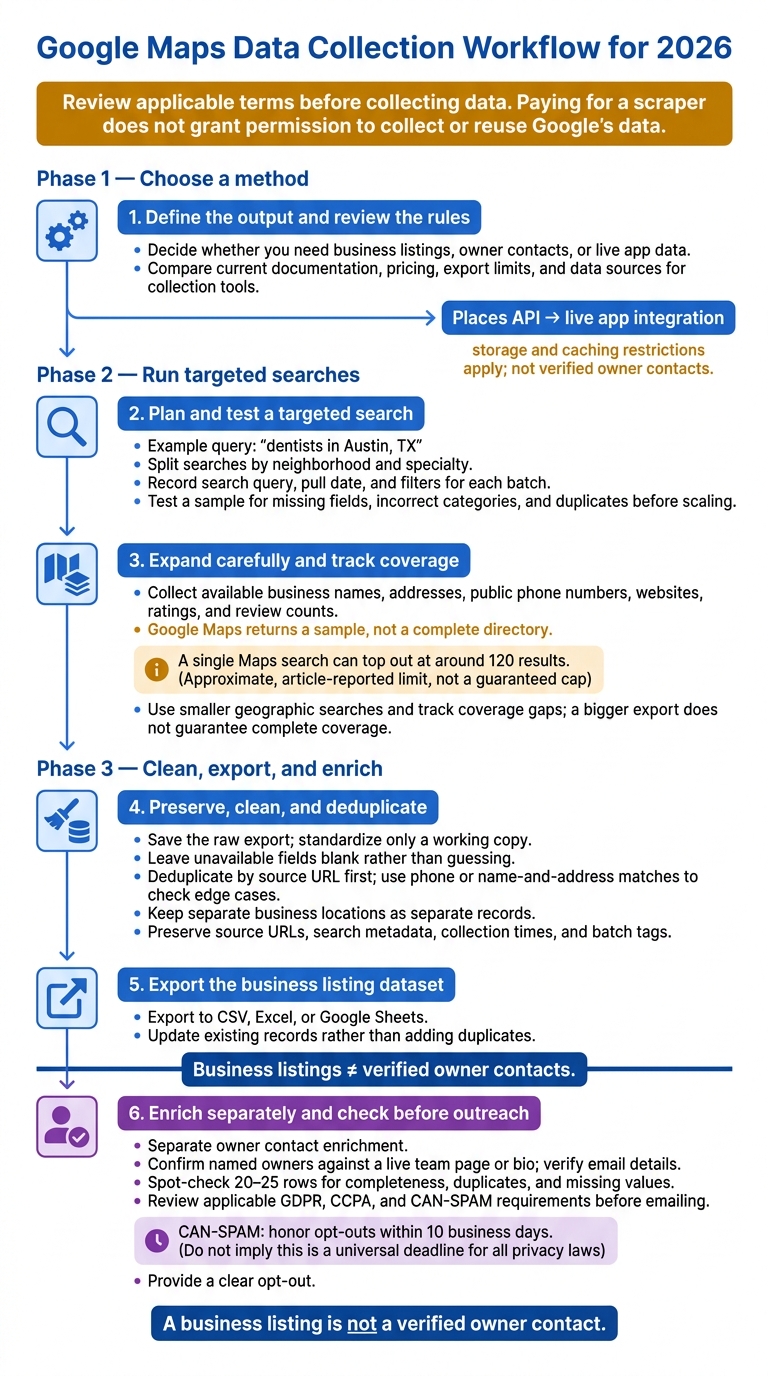
Google Maps Data Collection Workflow for 2026
1. Choose a collection method and review the rules
Start with the output you need: business listings, owner contacts, or app data. Before paying, check the current docs, pricing, export limits, and data sources. Your choice will shape the keyword-and-location searches you build next.
Compare LocalPipe with scrapers and contact tools
| Tool | Collection and enrichment | Export/access | Best fit and limits |
|---|---|---|---|
| LocalPipe | Live Maps search → owner contact enrichment → export | CSV, API, Clay integration | Local outreach; credits are charged only on successful finds |
| Outscraper | Bulk Maps listings and public business phones | CSV, JSON, API | Listing pipelines; owner contact enrichment requires another tool |
| Apify | Actor-dependent Maps collection | Datasets, API, scheduling | Custom pipelines; owner contact enrichment requires additional steps |
| PhantomBuster | Browser-based Maps collection | CSV, JSON | Automation; enrichment requires another tool, and execution limits apply |
| Scrap.io | Large-area Maps searches | CSV, Excel | Broad geographic research; owner contact enrichment requires another tool |
| D7 Lead Finder | Local lead discovery | CSV, PDF | Quick discovery; search limits apply, with no assured owner identification |
The tool you choose affects your coverage, the cleanup you’ll need, and whether you can find owner contacts in the same workflow.
LocalPipe focuses on local lead enrichment. It searches by keyword and location, lets you filter by rating, reviews, website, and price level, and exports results to CSV or API.
Consider the Google Places API
Third-party tools don’t bypass Google’s collection restrictions. Section 3.2.3(a) of the Google Maps Platform terms prohibits exporting, extracting, or scraping Maps content for use outside the services. Paying for a scraper does not give you permission to collect or reuse Google’s data.
The Places API is the official route for app integration - not a source for a prospect database. Depending on your request, it can return phone numbers, ratings, review counts, hours, and price level. It does not provide verified owner contacts.
Before sending requests, check SKU-based billing, quotas, and free usage allowances. Storage and caching rules vary by content type, so don’t assume you can turn API results into a permanent, exportable prospect database.
Use the Places API for live app data. For outreach lists, assess scrapers or enrichment tools against the applicable terms and privacy requirements before collecting or reusing data.
Next, build targeted keyword-and-location searches around your chosen method.
2. Run keyword-and-location searches
Test one search with the scraper or API workflow you chose above before scaling up. Google Maps returns a sample, not a complete directory. Pagination limits, nearby results, and changing listings can leave gaps.
Plan searches for dentists in Austin
Start with this query:
“dentists in Austin, TX,”
Then narrow your searches by specialty and neighborhood. For dense areas, use several smaller geographic searches instead of one broad query. Location terms aren’t exact, so nearby listings may still appear.
Log the search query, pull date, and filters for each batch to build local business lead lists faster.[2]
Set up the scraper and test results
Check a sample against a lead enrichment checklist for missing fields, incorrect categories, and obvious duplicates before collecting more results. Verify the available business names, addresses, phone numbers, websites, ratings, and review counts. Leave unavailable fields blank rather than guessing.
Collect more results and track coverage gaps
Once the first batch looks clean, expand into nearby neighborhoods. A single Maps search can top out at around 120 results. Split broad queries into smaller searches - a bigger export won’t necessarily fill coverage gaps.[2]
Duplicate listings don’t add new leads. Recheck older batches before outreach, since businesses can close, move, or change their details.[2]
3. Clean, export, and enrich the listings
Standardize fields and remove duplicates
Save the raw export and create a working copy for cleanup. Standardize only the working copy so you can always check the original data.
| Fields | Cleaning action | Why it matters | Missing values |
|---|---|---|---|
| Business name, address, city, state | Trim extra spaces and use consistent formatting | Makes matching and review easier | Leave blank rather than guessing |
| Phone, website | Keep the original value and use consistent formatting | Prevents import errors | Leave blank if unavailable |
| Rating, review count | Keep values numeric and consistent | Keeps spreadsheet values accurate | Leave blank if missing |
| Source URL, search keyword, search location | Keep each row traceable to its source | Supports source checks | Leave metadata blank if missing |
| Collected at | Record collection times in a consistent format | Shows how current the data is | Flag unknown collection times |
Remove duplicates by source URL first. Use phone numbers or name-and-address matches only to check edge cases. Keep separate business locations as separate records, and preserve source tags when merging rows.
Once the list is clean, export it in the format your sales tools use.
Export to CSV, Excel, or Google Sheets
Export to CSV, Excel, or Google Sheets, keeping formatting intact. Update existing records instead of adding duplicates, and retain listing URLs and batch tags for attribution.[2]
This export is the handoff from Maps collection to prospecting.
Find owner contacts with LocalPipe or other tools
If your goal is outreach, add owner contacts after export. Keep this contact data separate from the Maps listing data. Use raw scrapers for listings and LocalPipe when you need owner contacts (see how LocalPipe vs Outscraper compare for lead generation).
Match the tool to the job:
| Feature | LocalPipe | Outscraper / Apify | Apollo / ZoomInfo |
|---|---|---|---|
| Primary output | Listings + owner contacts | Raw Google Maps listings | Corporate B2B records |
| Email verification | Built-in triple-check | Separate step required | Check current product documentation |
| Billing model | Pay only on successful finds | Tool-dependent usage pricing | Check current terms |
| Best fit | Local SMB owner outreach | Bulk data or market analysis | Corporate or enterprise targeting |
Use DIY Clay only for custom workflows that combine multiple sources. After adding contacts, check named owners against a live team page or bio to confirm they still hold the role.[2] Compare owner-match accuracy, not just the number of rows returned.
Conclusion: Check your list before outreach
The exported Austin batch contains business data - not verified owner contacts. Before outreach, check that the file includes only fields the source returns. Add owner contacts separately.
Run through this checklist before sending anything.
Use a final quality and compliance checklist
- Review Google Maps Platform Terms of Service, Section 3.2.3(a), and spot-check 20–25 rows for completeness, duplicates, and missing values.
- Add search and pulled-date columns so you can track how current the data is.[2]
- Check About Us or team pages to confirm each contact still holds the role.[2]
- Before emailing, review GDPR, CCPA, and CAN-SPAM. Provide a clear opt-out and honor opt-outs within 10 business days.[2]
FAQs
How can I measure my local search coverage?
Measure cost per usable owner contact - not exported rows. A usable contact is an in-market business with a verified owner name and contact details, with duplicates removed.
Test each tool with a 50–100-record pilot, using the same searches and deduplication rules. Compare owner-name match rates, verified emails, direct phone accuracy, and bounce rates over time. Keep hard bounces under 2% and spam complaints below 0.3%.
To calculate cost per usable owner contact, add up software, enrichment, verification, and labor costs. Then divide that total by the number of qualified, reachable leads.
How often should I refresh my lead list?
Check owner contact details on records older than 30 days. If a list has sat unused for several months, re-verify those details before launching another outreach campaign.
Business data changes, so choose live, on-demand enrichment over static, precompiled databases. Regularly audit a sample of 25 records to spot errors, and log each row’s pull date so you can track its age.
Does a public business email imply outreach consent?
No. A public business email address does not mean someone has consented to outreach. Email verification checks whether an address can receive email. It does not give you legal permission or ethical approval to contact that person .
No matter where you get contact information, follow applicable regulations, including CAN-SPAM for email and the TCPA for calls or texts. Apply suppression lists and honor opt-out requests within the required timeframes [2][3].