How to build a TAM list of every SMB in your territory from Google Maps data
Step-by-step workflow to collect, dedupe, and enrich Google Maps listings into an auditable TAM of SMBs.

How to build a TAM list of every SMB in your territory from Google Maps data
I build a Google Maps TAM list in three steps: collect overlapping searches, remove duplicates, and add owner contacts. The result is a dated estimate of local businesses - not a census of every SMB.
Here’s the workflow I use:
- Define the market: Set territory boundaries, business categories, size rules, and whether I’m counting locations or companies.
- Collect and clean: Search each category across overlapping areas, save raw exports, and match duplicates by Google Place ID first.
- Add contacts separately: Test enrichment tools on 20–100 businesses, then keep contact results linked to the master list without changing its count.
- Audit and export: Report raw listings, qualifying businesses, and businesses with verified owner contacts as three separate totals. Save dated snapshots for later updates.
My rule: <u>missing contact data does not mean a missing business</u>. Listings without websites or owner emails can still belong in your TAM - and verified contact details are not permission to contact.
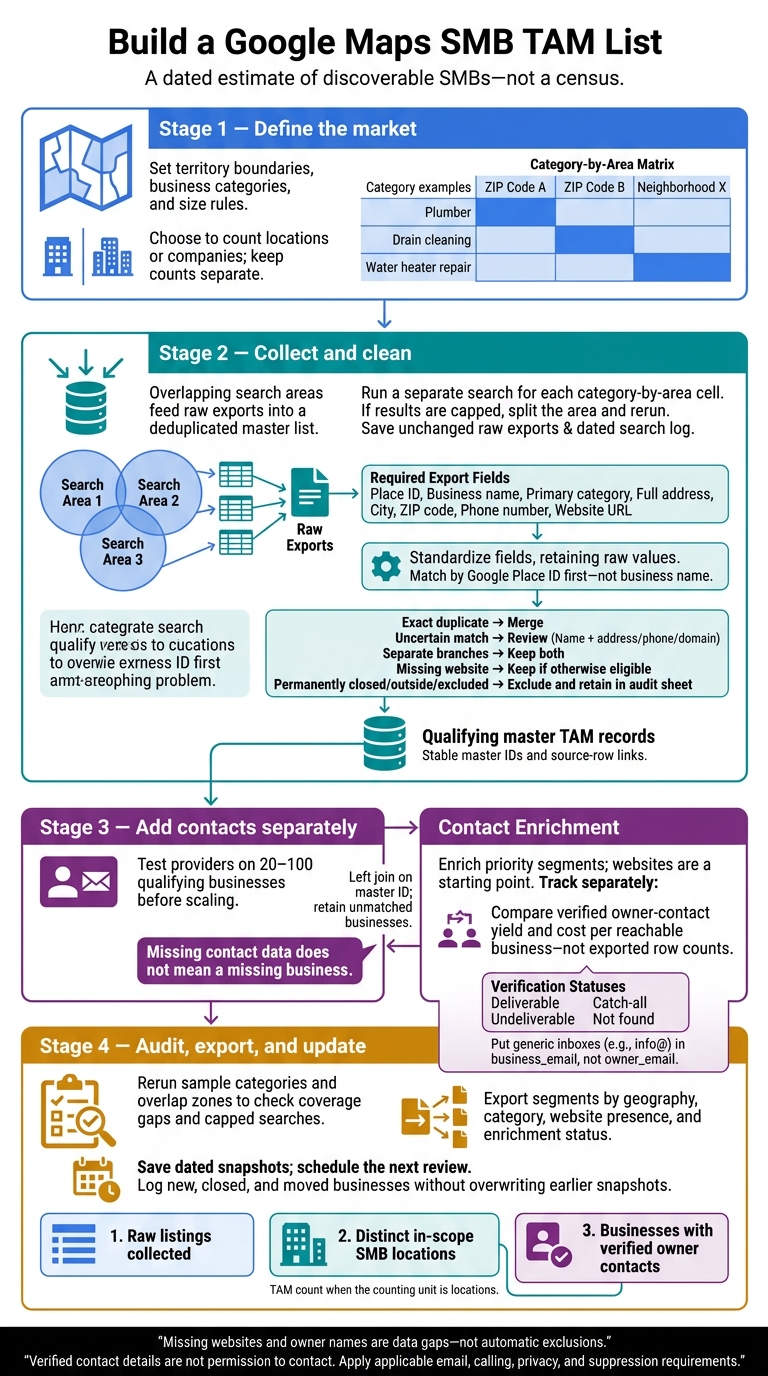
Build a Google Maps SMB TAM List
Step 1: Collect listings through overlapping searches
Divide the territory into overlapping search areas
Build a matrix of categories by area. Put categories and synonyms in the rows, with ZIP codes or neighborhoods in the columns. Run a separate search for each cell. Overlapping areas help you find businesses near boundaries that a single search might miss.
Search related terms such as “plumber,” “drain cleaning,” and “water heater repair” across every area, with overlap along boundaries.
Use coordinate-based areas when the tool supports them.[1]
If results hit a cap, split the area into smaller neighborhoods or ZIP codes and search again. A county-wide result set doesn't prove full coverage.[1]
Choose your tool before running the matrix.
Compare listing collection tools
Choose your listing collection workflow separately from owner-contact enrichment. Before running the full matrix, check that the tool supports your boundary type, category queries, and required export fields.
| Tool | What to check | Best fit |
|---|---|---|
| LocalPipe | Live local searches and CSV export schema | Best for live local business listing collection.[1][2] |
| Outscraper | Location inputs, category queries, and export schema | Good for raw Google Maps listing collection. |
| Apify | Location inputs, category queries, and export schema | Good for automated listing collection workflows. |
At minimum, exports should include a minimal checklist of lead enrichment fields including Place ID, business name, primary category, full address, city, ZIP code, phone number, and website URL.[1] Keep listings that don't have websites - roughly 20% to 30% of local businesses on Google Maps lack one.[1]
Save raw exports and a search log
Save each raw export without changes. In your search log, record the filename, exact query, boundary, date, tool settings, result count, and status: Completed, Failed, or Capped. Keep Place IDs for deduplication.[1]
For capped searches, log the smaller replacement areas. Rerun failed queries separately instead of repeating the whole territory. This helps you spot coverage gaps without mistaking overlapping results for additional businesses.[1]
Next, merge the overlapping exports and dedupe them by Place ID, name, and address.
sbb-itb-3041e27
How to Find Business Leads With Google Maps
Step 2: Merge listings and remove duplicates
Combine the raw exports into one deduped master TAM list before enrichment.
Standardize fields and match duplicate records
Keep raw values alongside cleaned fields. For matching names, remove legal suffixes like LLC and Inc. Standardize street abbreviations, city names, and two-letter state codes. Use one phone format, and strip protocols, www, and trailing slashes from website domains.[1]
Match by Google Place ID first - not business name. If IDs are missing or different, flag possible duplicates using name + address, name + phone, or domain + nearby address. Don’t merge separate branches just because they share a brand, phone number, or website. Deduping prevents overlap from inflating the TAM count.[1]
Keep source_query, search_area, and collected_at in a linked source sheet without overwriting source rows. Log which source rows feed into each merged master record.[1]
Review uncertain matches and excluded listings
Add category_searched, search_area, duplicate_status, excluded_reason, and enrichment_status. Keep search metadata separate from master-record fields, and use these rules to decide what counts toward TAM.[1]
| Record type | Decision | Status or audit action |
|---|---|---|
| Exact duplicate with the same Place ID | Merge | Set duplicate_status=merged; retain source-row links |
| Likely duplicate with different or missing IDs | Review | Set duplicate_status=review and enrichment_status=pending |
| Separate branches | Keep both | Retain distinct master records and location details |
| Closed permanently | Exclude | Set excluded_reason=permanently_closed |
| Missing website | Keep if otherwise eligible | Set enrichment_status=manual_required |
| Outside the defined territory | Exclude | Set excluded_reason=out_of_bounds |
| Franchise excluded by your inclusion rules | Exclude | Set excluded_reason=franchise_out_of_scope |
Keep excluded records in an audit sheet rather than deleting them. Log each exclusion decision and its reason. For every merge, record the surviving master ID. Count only qualifying master records.[1]
With the master list cleaned, move to owner-contact enrichment without changing the TAM count.
Step 3: Add owner contacts without changing the TAM count
A missing owner email is not a missing business. Enrich only priority segments from the master list, then use a left join on the master ID to bring results back. That way, businesses without a match stay in the TAM. Keep multiple contacts in a separate linked sheet so one business doesn’t become several counted records. Enrichment and TAM counting should stay separate.
Find owner contacts with LocalPipe
Use LocalPipe to add contact details to existing business records. It pulls live owner data from business sites, social profiles, registries, and review sites, returning owner names, verified emails, and direct phone numbers. Title-based searches can also help you find other decision-makers when needed. For batch work, use CSV exports. For repeatable workflows, use API access, webhooks, or the Clay integration. Start with businesses that have websites - they’re more likely to return results.[5]
LocalPipe reports an approximately 75% owner-name find rate, compared with approximately 30% for DIY Clay flows. It also reports triple email verification and sub-1% bounce rates. These are vendor claims, not independent benchmarks.[5] Finding an owner’s name doesn’t mean finding their email, either. Check current credit costs and which events trigger charges before running the full list.[2]
Compare contact enrichment options
Test every provider on the same 20–100 qualifying businesses before scaling.[4][5] Compare verified owner-contact yield and cost per reachable business, rather than exported row counts. Track owner names, verified owner emails, and direct phones as separate success measures.
Each option below serves a different need. Check current documentation for verification methods, credit rules, and plan limits.
| Tool | Best fit and owner-contact coverage | Verification considerations | Setup and billing considerations |
|---|---|---|---|
| LocalPipe | Local SMB owner discovery; live research rather than database-only lookup | Triple email verification | CSV, API, webhooks, or Clay; successful-find credits |
| Enterprise databases (Apollo, ZoomInfo) | Corporate B2B and enterprise targeting; less suited to local-owner discovery | Check match quality on your SMB sample | Database-based workflow; confirm current plans |
| B2B databases (Lusha, Seamless.ai, UpLead, Cognism) | Broader B2B prospecting; local-owner coverage varies | Check each provider’s verification scope | Platform-based; compare current credit and export rules |
| Hunter | Domain-based email discovery, not proof of ownership | Email verification does not establish the person’s role | Straightforward domain searches; confirm search and verification costs |
| DIY Clay workflows | Custom, multi-source enrichment | Depends on providers and workflow design | Requires assembly and maintenance; account for each enrichment step |
| Local lead tools (D7 Lead Finder, LeadSwift, Scrap.io) | Local lead discovery; don’t assume returned contacts belong to owners | Check whether emails are collected, verified, or owner-matched | Useful for business-level prospecting; confirm current features and billing |
Record contact sources and verification status
Add owner_name, owner_title, owner_email, business_email, direct_phone, verification_status, enrichment_source, and enrichment_date. These fields support outreach; they don’t determine TAM eligibility. Save source URLs or evidence linking each contact to an owner role. A filing match alone doesn’t prove that role.
Distinguish deliverable, undeliverable, catch-all, and not found, and record the verification date separately. Put info@ and similar inboxes in business_email. Exclude them from owner-only outreach exports - not from the TAM.
Apply applicable email, calling, privacy, and suppression requirements before outreach: verification does not establish permission to contact.[5] Store enrichment metadata separately from the master TAM fields.
Conclusion: Check coverage and export your TAM list
Your final TAM is a dated estimate of discoverable SMBs, not a full census. [1]
Audit coverage and report 3 separate totals
Rerun sample categories and overlap zones to check for capped searches and obvious gaps. [1]
Report three totals separately: raw listings collected, distinct in-scope SMB locations, and businesses with verified owner contacts. Treat missing websites and owner names as data gaps - not reasons to exclude a business. [1]
After auditing the counts, turn the master file into a sales-ready export. You can also use these workflows to build lead lists faster during future updates.
Export sales segments and schedule updates
Export a clean CSV or spreadsheet with stable record IDs, business names, categories, addresses, websites, Maps URLs, collection dates, and verification status. Segment records by geography, category, website presence, and enrichment status. Keep location counts separate from company counts before using the file for sizing, assignment, or outreach. [1]
Set an update schedule and a next review date. Log new, closed, and moved businesses without overwriting earlier snapshots. Keep raw exports, search logs, territory boundaries, and deduplication decisions. [1]
FAQs
How can I estimate businesses missing from Google Maps?
No single scrape guarantees a complete business count. Search by category, neighborhood, and ZIP code, and manually scan sections of the map. Track each search in a spreadsheet to spot coverage gaps and areas with few results.
Treat your list as a research queue, not a complete directory. Raw scrapers like Outscraper and Apify can’t account for missing businesses. To improve accuracy, manually cross-check business filings or industry directories for businesses Google Maps may have left out.
How do I turn my SMB count into revenue potential?
Start by removing duplicates, franchises, and businesses outside your target niche. Then add verified owner names, direct emails, and phone numbers to your Google Maps records. LocalPipe focuses on local SMB enrichment, while Apollo and ZoomInfo are better suited to broader B2B targeting.
Prioritize prospects with missing websites, low review counts, or weak profiles. Import your cleaned, segmented list into your CRM, then use the owner contact details for targeted outreach.
How often should I refresh my TAM list?
Update your priority markets quarterly or every six months [1]. Local business data changes, so keeping your list current matters just as much as its initial size [2].
Static databases may contain outdated records. Live, on-demand enrichment tools like LocalPipe pull from current sources when you request data [3][2]. Track when each territory was last searched or updated so you can prioritize segments that need another pass [1].