Best small business owner data providers for alternative lenders: pricing, coverage, and verified contact rates
Compare providers by pricing, owner-contact coverage, verification rates, and cost per usable owner contact for alternative lenders.

Best small business owner data providers for alternative lenders: pricing, coverage, and verified contact rates
I’d test LocalPipe for local owner outreach, Apollo for corporate contacts, and Data Axle or Dun & Bradstreet for business lists and risk data. LocalPipe starts at $57/month; Apollo’s paid plans start at $49/user/month with annual billing. Neither price tells you what a usable owner contact will cost.
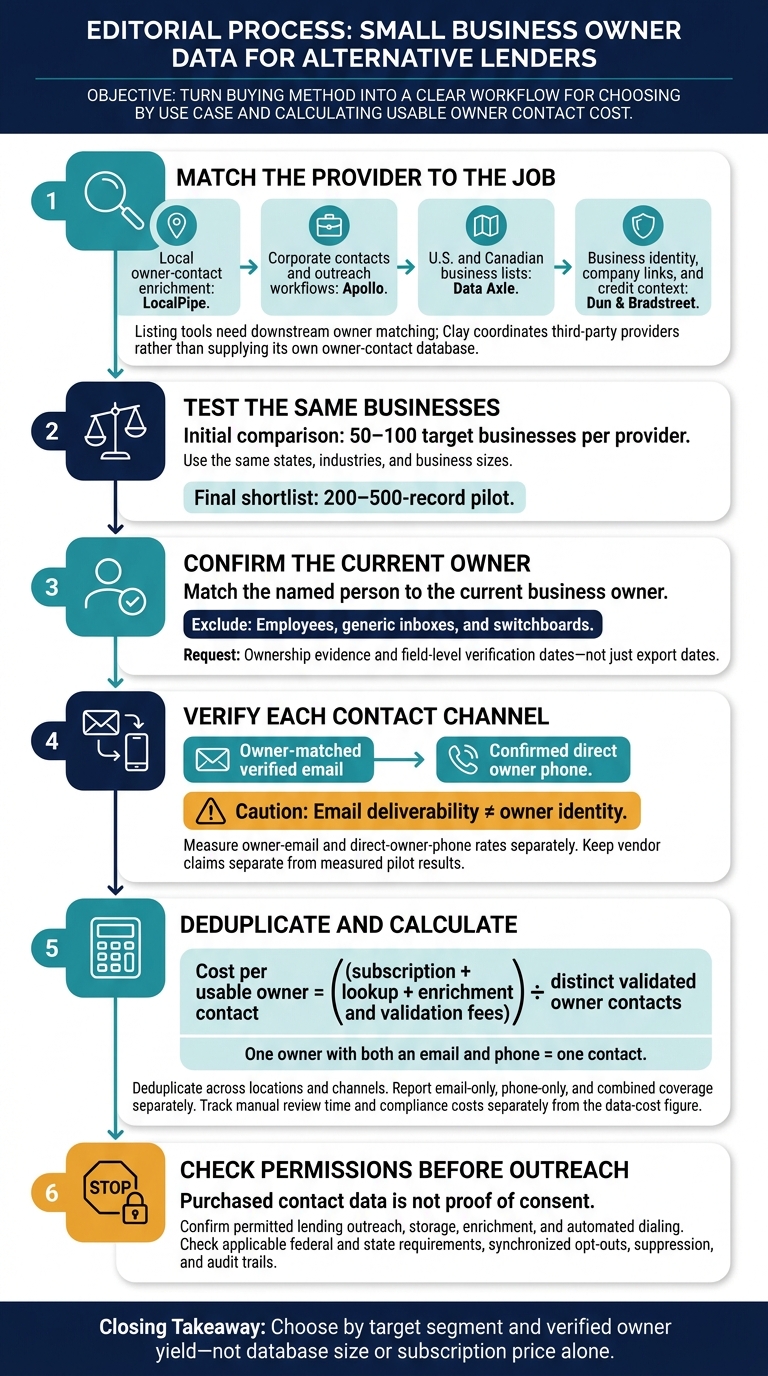
My buying rule: test the same 50–100 businesses before committing. Count current owners with verified emails or direct phones - not generic inboxes, employees, or switchboards. LocalPipe reports a 75% owner-name rate, but that is a vendor claim, not an independent result.
Quick Comparison
| Provider or tool group | Where I’d use it | Price or cost check |
|---|---|---|
| LocalPipe | Local owner-contact enrichment | From $57/month; check field-specific credits |
| Data Axle | U.S. and Canadian business lists | $50–$75 per 1,000 API records; add owner-enrichment costs |
| Dun & Bradstreet | Business identity, company links, and credit context | Product-specific quote |
| Apollo | Corporate contacts, email sequences, and CRM connections | From $49/user/month, billed annually |
| Outscraper, Apify, Scrap.io, PhantomBuster, D7 Lead Finder, LeadSwift | Local business list collection | Compare extraction fees and downstream owner matching |
| ZoomInfo and Cognism | Mid-market and enterprise contacts | Written quotes; check annual commitments |
| Lusha, Hunter, UpLead, and other contact lookup tools | Adding contacts to existing lists | Check owner matches, credit charges, and verification terms |
| Clay with third-party providers | Multi-provider lookup workflows | From $167/month, billed annually, plus data costs |
I’d compare each option on U.S. coverage, current-owner matches, email and phone verification, contract terms, and cost per usable contact. Divide total sourcing and verification fees by distinct accepted owners, then track labor and compliance costs separately.
One rule applies across every option: <u>purchased contact data is not proof of consent</u>. Check outreach permissions and suppression requirements before using it.
How to Compare Small Business Owner Data Providers
1. LocalPipe
Pricing and commitments
LocalPipe lists four public plans: Starter at $57/month, Growth at $97/month, Pro at $157/month, and a usage-based tier at $97/month plus usage. Every plan includes unlimited seats and API access. The usage-based tier also adds auto top-ups, Google Maps scraping tools, and no charge for results already found.[2]
| Plan | Monthly price | Included credits | Listed owner names |
|---|---|---|---|
| Starter | $57 | 2,000 | 1,400 |
| Growth | $97 | 5,000 | 3,500 |
| Pro | $157 | 10,000 | 7,000 |
| Usage-Based | $97 + usage | Usage-based | Not published |
Enrichment credits are used only when a lookup returns a verified result.[4]
Business and geographic coverage
LocalPipe claims full coverage of the Google Maps index, estimated at about 250 million businesses worldwide. You can scrape Google Maps for business leads using LocalPipe's native integration to build these lists. It finds businesses live, then adds data from websites, Facebook, Instagram, BBB, and Secretary of State records.[2][3]
The platform supports international searches but is strongest for U.S. trades, clinics, restaurants, retail, and home-service businesses. Treat its Google Maps claim as discovery reach - not verified owner-contact coverage. Compared with Outscraper, LocalPipe adds owner enrichment. Apollo is better suited to corporate prospects with stronger professional profiles.[2][3]
Owner contacts and verification
LocalPipe reports a 75% owner-name find rate, a 60% email find rate across business and owner emails, and a 20% direct-owner-phone rate. These are provider claims, not independently measured results.[2][3][4]
The company says it triple-verifies emails through MillionVerifier, ZeroBounce, and NeverBounce and reports a bounce rate below 1%. But email deliverability checks don't confirm that a contact belongs to the current owner.[2][3][4]
Cost per usable owner contact
To calculate cost per usable owner contact, divide total sourcing and enrichment spend by the number of usable, verified owner contacts returned. Track owner emails and direct phones separately because they use different credit amounts. If an owner appears through both channels, count that person only once.[2][4]
Next, compare this live-enrichment model with broader firmographic databases like Data Axle and Dun & Bradstreet.
sbb-itb-3041e27
7 Best B2B Data Providers (Full Demo & Comparison)
2. Data Axle
Data Axle works best as a list-building database, not a verified owner-contact source. It offers a broader database approach than LocalPipe’s local-owner enrichment model.
Pricing and commitments
Public API pricing is $50 per 1,000 Standard records and $75 per 1,000 Enhanced records. Volume bands and minimums aren’t disclosed, and higher-volume terms may require a quote.[1] Get terms in writing and check coverage for your target geographies and industries before setting a budget.
Business and geographic coverage
Data Axle markets more than 62 million U.S. and Canadian businesses. Its API reports 19.5 million places, 183 million contacts, and 400 attributes - but those totals don’t tell you how many owners you can reach.[1]
Geographic and SIC-style industry filters help lenders build target lists. The outreach test is whether those records identify named owners, not just businesses that match your criteria. If you need to find the owner of a local business specifically, manual verification or specialized tools are often required.
Owner-contact availability and verification
Data Axle is a better fit for direct mail and phone outreach than owner-email prospecting. Email coverage is described as partial, and the supplied data provides no verified owner-email rate for U.S. small businesses.[1] Check owner fields in a sample before treating the records as outreach-ready.
Cost per usable owner contact
The per-record price is only part of the cost. Add lead enrichment and email verification fees, then measure how many purchased records yield usable owner contacts.[1]
Next, compare Data Axle with Dun & Bradstreet, which is stronger for identity and risk data than for outreach-ready owner contacts.
3. Dun & Bradstreet
D&B Hoovers is better suited to firmographic targeting and corporate linkage than owner-level outreach. While Data Axle focuses mainly on list building, D&B puts more weight on identity resolution and credit context.
Pricing and commitments
Finance Analytics serves lenders and credit managers, making it a better fit for risk screening than owner prospecting. Neither product has published pricing. Request quotes that spell out seats, export limits, API minimums, contract length, renewal terms, and contact access.
Business and geographic coverage
Hoovers draws on the D&B Data Cloud, which offers more than 500 million global business records. For lenders, though, global totals matter less than coverage of U.S. private companies, sole proprietors, and local businesses - and the identity and linkage fields included.
Those records only help with owner outreach if you can connect them to the right owner or decision-maker.
Owner-contact availability and verification
Confirm whether the contacts are owners, executives, or switchboards. The supplied material provides neither independent owner-contact rates nor verification methods.
Failure Scores and Delinquency Scores add credit context, not owner-contact data. That difference affects outreach efficiency and the total cost per usable contact.
Cost per usable owner contact
To calculate this cost, divide total subscription, export, API, and verification costs by the number of usable owner contacts in a matched sample.
Compare Hoovers with LocalPipe for owner outreach, keeping that comparison separate from Finance Analytics’ credit-risk value. D&B may justify its cost for underwriting and risk context without justifying it as a standalone owner-contact source.
4. Apollo
Pricing and commitments
Apollo’s Free plan includes 50 email credits per month, or 600 per year, with no stated credit-card requirement.[10] With annual billing, Basic costs $49 per user per month, Professional costs $79, and Organization costs $119.[11][12] Organization requires at least three users, putting its minimum cost at $357 per month with annual billing.[11][12]
Basic is the lowest-priced paid tier for solo lenders and small teams. It includes database access, unlimited sequences, and CRM integrations.[11] Professional adds a U.S. dialer, while Organization adds an international dialer, SSO, and advanced security controls.[11][12]
Before buying, check taxes, add-on credit charges, and monthly-billing prices. Apollo says unused credits expire at the end of each billing cycle.[6][12]
Business and geographic coverage
Apollo’s database size matters less than whether it finds owners in your target local niches. The company advertises 240 million people and 30 million companies. But these are provider-published figures - not audited counts of current U.S. small-business owners.[11][13]
Test a sample matched to your target states and industries, filtering by owner role, before relying on Apollo for SMB-owner coverage. Treat its published figures as a database benchmark, not a measure of local-owner coverage.
Owner-contact availability and verification
Apollo charges no more than one credit for a contact’s primary verified email and may refund that credit if the email bounces within 30 days.[7][8][9] Phone access is separate from email credits.[12]
Email verification checks deliverability, not ownership. The supplied sources do not establish an independent owner-contact rate for U.S. small businesses.
Cost per usable owner contact
Use the free plan to test 50 matched businesses. Track owner match rate, verified email rate, and phone rate separately.[10] Run the same sample through LocalPipe and Outscraper, then divide subscription, usage, and review costs by the number of usable contacts that pass your targeting and compliance checks.
Basic may be worth the cost if sequencing and CRM integration also save you work. A low subscription price alone, though, doesn’t prove a low cost per usable owner contact.[11]
Next, compare Apollo with local listing tools that build business records but don’t enrich owner contacts. You can also follow a step-by-step guide to building lead lists to optimize your outreach.
5. Local Listing Tools: Outscraper, Apify, Scrap.io, PhantomBuster, D7 Lead Finder, and LeadSwift
Pricing and commitments
Price extraction and owner enrichment separately. The supplied sources support detailed pricing for Outscraper and selected Apify Actors, but not verified current prices for the other four tools. Use these tools to build local business lists before owner enrichment - not as final outreach sources.
| Tool | Pricing and credit rules | API, exports, and commitments |
|---|---|---|
| Outscraper | First 500 Google Maps businesses free; $3 per 1,000 for records 501–100,000; $1 per 1,000 above 100,000. Pricing tiers reset every 30 days.[14] | No recurring fee advertised. CSV, Excel, Parquet, and JSON exports; paid tiers list API access and enrichment.[14] |
| Apify | Actor-specific pricing. Separate result charges from platform, runtime, storage, proxy, and enrichment costs.[16][17] | API and dataset workflows available. Fields, failed-run billing, and minimum charges depend on the Actor.[16][17] |
| Scrap.io | Pricing not verified in supplied sources. | Confirm current limits, exports, API access, and verification terms. |
| PhantomBuster | Pricing not verified in supplied sources. | Confirm current limits, exports, API access, and verification terms. |
| D7 Lead Finder | Pricing not verified in supplied sources. | Confirm current limits, exports, API access, and verification terms. |
| LeadSwift | Pricing not verified in supplied sources. | Confirm current limits, exports, API access, and verification terms. |
Business and geographic coverage
Outscraper and Apify are listing tools, not owner-contact databases. Outscraper extracts Google Maps records. Apify’s coverage depends on the Actor, source, and search settings. Typical fields include business name, category, address, website, main phone, ratings, and hours.[14][16][17]
For Scrap.io, PhantomBuster, D7 Lead Finder, and LeadSwift, check an export for source coverage and complete fields before sending records into owner verification. Require source URLs and collection dates. Even newly extracted records can contain outdated public information.
Owner-contact availability and verification
A verified owner contact is a current direct email or phone tied to the named decision-maker. Main business lines and generic inboxes don’t qualify. None of the supplied evidence establishes an independently measured owner-contact rate across these six tools. Check the actual owner-name, role, email, and direct-phone fields rather than assuming a business listing identifies its owner.
In LocalPipe’s October 2026 benchmark of 500 U.S. plumbing businesses, Outscraper returned 140 emails and 80 owner names. Only 60 emails were verified deliverable, and it returned zero direct owner mobile numbers. That puts the verified deliverable rate at 12.0% across the sample, with 16% owner-name coverage. These are vendor-reported results, not an independent audit. Deliverability alone does not establish owner identity.[3]
For enterprise-scale databases with different tradeoffs, move next to ZoomInfo and Cognism.
Cost per usable owner contact
Calculate this cost by dividing total extraction, subscription, enrichment, verification, and labor costs by the number of distinct verified owner contacts. The $9–$14 per 1,000 records is extraction cost, not usable owner-contact cost.[14][15]
Choose Outscraper or LeadSwift for low-cost listing acquisition when you already have enrichment. Consider Apify or PhantomBuster for configurable workflows. Before scaling, confirm duplicate, retry, and failed-search charges. Exclude generic inboxes and main business lines from verified-owner totals.
If you need corporate contact data instead of local-owner enrichment, move next to enterprise sales data.
6. Enterprise Sales Data: ZoomInfo and Cognism
Pricing and commitments
Get written quotes from both vendors. ZoomInfo typically starts around $15,000 per year and can reach $30,000–$60,000 with seats and add-ons. Cognism’s pricing and minimums were not disclosed.[5]
Confirm export allowances, repeat-export charges, API fees, required add-ons, contract length, renewal increases, and cancellation deadlines. Treat these terms as your cost floor before testing local-owner coverage. (See our guide on finding local business owners by city for more details.)
Business and geographic coverage
ZoomInfo and Cognism serve lenders looking for mid-market and enterprise company data rather than LocalPipe-style local-owner enrichment.[2][5] Their coverage is strongest for companies with active professional footprints and weaker for trades, sole proprietors, and other owner-operated businesses.[2][5]
No comparable coverage counts were supplied. Ask for sample matches across your actual states, industries, and business sizes.
Owner-contact availability and verification
ZoomInfo offers org charts and verified direct phone numbers, but an executive contact isn’t necessarily an owner.[5] Neither vendor supplied independently measured local-owner contact rates.
Require separate fields for owner name, proof of ownership, verify email addresses and check status dates, and whether a phone number reaches the owner directly or a switchboard. Don’t apply Apollo’s local-owner benchmark to ZoomInfo or Cognism.
Cost per usable owner contact
Run the same 50–100 target businesses through each vendor and LocalPipe to compare local-owner prospecting costs.[2][5] Count named owners with verified, deliverable emails separately from owners with confirmed direct phone numbers.
Add up all committed subscription, export, API, enrichment, and verification costs. Then divide that total by the usable contacts you expect to obtain during the contract.
For lower-cost contact appends rather than enterprise datasets, compare Lusha, Seamless.ai, Hunter, and UpLead next.
7. Contact Lookup Tools: Lusha, Seamless.ai, Hunter, and UpLead
Use these tools after you have a business list. They add contacts to existing records rather than find businesses. If you need to build local business lead lists from scratch, a different workflow is required.
Pricing and commitments
Lusha starts at approximately $37 per user/month, billed annually, with a free tier available. UpLead starts at approximately $99/month.[5][1] The supplied sources don’t disclose pricing, minimums, credit rules, or API costs for Hunter or Seamless.ai.
UpLead advertises a 95% accuracy guarantee, real-time email verification at export, and credit-back provisions for bounced emails. Check the contract terms before buying.[1]
Price matters less than whether the tool returns usable owner contacts in your target segment.
Business and geographic coverage
These tools tend to fit registered companies better than owner-operated local businesses.[2][3] Lusha is best for quick LinkedIn lookups, while Seamless.ai suits mid-market prospecting. Hunter works for domain-based searches. Of these options, UpLead is the strongest choice for adding owner contacts to local professional-service lists.[5][3][4][1]
Owner-contact availability and verification
In a vendor-reported sample of 500 plumbing businesses from October 2026, Seamless.ai returned emails for 8.1% of records, compared with 6.3% for Hunter. Of the emails returned, 87% from Seamless.ai and 71% from Hunter were rated valid.[3]
Direct owner mobile contact rates in the same sample were 3.7% for Seamless.ai and 3.1% for Hunter. Treat these as result rates - not proof of what a workflow can do.[3]
No comparable owner-contact rates were supplied for Lusha or UpLead. UpLead’s accuracy guarantee and verification claims are not independently measured owner-identification rates.[1] The supplied information also doesn’t explain how Lusha or Seamless.ai verifies contacts.
For every tool, distinguish a named owner’s email or direct number from a shared inbox or main business line.
Cost per usable owner contact
Calculate cost using accepted, owner-matched contacts - not all returned records. LocalPipe’s pay-on-find model may cost less per usable contact for main-street lending. UpLead is the better starting point for professional-service firms with stronger web footprints.[4][1]
If none of these lookup tools covers your niche, move next to Clay-based custom workflows for local lead generation.
8. Custom Workflows: Clay and Third-Party Data Providers
When one lookup tool falls short, Clay lets you connect multiple providers in a waterfall. Clay is a workflow layer, not a built-in owner-contact database. Results depend on which providers you connect and the match rules you set.[5]
Pricing and commitments
Clay Launch costs $167/month billed annually, before third-party data costs. LocalPipe starts at $57/month, with lookup charges only when a result is returned. To calculate the full workflow cost, include subscriptions, credits, and maintenance.[5][2]
Business and geographic coverage
For lenders targeting local SMBs, LocalPipe can add data on U.S. trades and owner-operated local businesses within a Clay workflow. It uses live sources such as Google Maps, social profiles, BBB records, and Secretary of State filings. Clay coordinates the workflow; it doesn’t add coverage.[4][1]
Owner-contact availability and verification
Owner-match rates in a Clay waterfall depend on provider order, duplicate removal, and fallback rules - not a standalone Clay benchmark. LocalPipe says it triple-verifies returned emails using MillionVerifier, ZeroBounce, and NeverBounce.[3][4]
Test how many verified owner emails and direct owner phone numbers the workflow returns. Then compare those results against the pricing and contract terms below.
Cost per usable owner contact
Run the same 50 to 100 target businesses through each workflow. Compare the verified owner emails and direct owner phone numbers returned.
Divide total subscription, lookup, verification, and labor costs by the number of distinct, accepted owner contacts - not the number of raw fields returned. LocalPipe uses credits only for successful results: 1 credit for a business email, 2 for an owner email, and 5 for an owner phone. These are usage units, not dollar prices. A business email counts as a usable owner contact only when it’s matched to the owner.[5][3][4]
Pricing, Contract Terms, and Business Coverage
The tables below bring the earlier vendor reviews into focus around two questions for lenders: What does each usable owner contact cost, and does the provider reach actual owners?
Pricing and contract terms
Separate published terms from details that require a written quote. “Not documented” means the sources reviewed here did not publish that information. Once you know the costs, check where each provider reaches local owners.
| Provider | Published pricing and terms | Quote and contract checks |
|---|---|---|
| LocalPipe | Starts at $57/month; unlimited seats; API included; credits used only for successful enrichments. [2][4] | Confirm rollover and cancellation terms. |
| Apollo | Free tier; paid plans start at about $49/user/month, billed annually; Organization requires 3 users. [11][12] | Confirm additional credit charges, API access, and renewal terms. |
| Data Axle | API pricing: $50 per 1,000 Standard records; $75 per 1,000 Enhanced records. Minimums not disclosed. [1] | Request product-specific licensing, volume, and contract terms. |
| Dun & Bradstreet | Pricing and minimums not documented. | Request a product-specific quote covering the exact dataset, permitted uses, delivery fees, and renewal terms. |
Compare quotes by cost per usable owner contact, not cost per raw record. Define which results are billable before signing.
Business and geographic coverage
A large database doesn't guarantee access to owners. This table separates Maps-first enrichment from role-based B2B databases.
| Provider | Coverage focus | Targeting inputs | Main coverage caveat |
|---|---|---|---|
| LocalPipe | Maps-first local enrichment; optimized for the U.S. | Business category and geography | A Maps presence doesn't guarantee an owner match. [2][4] |
| Apollo | Role-based corporate prospecting | Company filters, headcount, technographics, title, seniority, and intent | Better suited to corporate roles than local owner-operated businesses. [2] |
| Data Axle | U.S. and Canadian business lists | Geography and industry filters | Confirm whether named-owner contact fields are available. [1] |
| Dun & Bradstreet | Global firmographics, identity, and corporate linkage | Confirm industry, geography, and contact filters for the selected product | Business coverage doesn't establish owner-contact availability. |
Local-tool comparison
Choose a tool based on the workflow stage you need: live local enrichment, listing extraction, or a configurable workflow with downstream enrichment.
| Tool | Workflow fit | Owner enrichment | API/export access |
|---|---|---|---|
| LocalPipe | Live local enrichment | Named-owner enrichment included | API on all plans; exports available. [2][3][4] |
| Outscraper | Google Maps listing extraction | Budget for downstream owner matching | API/export options. [14] |
| Apify, Scrap.io, PhantomBuster, D7 Lead Finder, LeadSwift | Depends on the workflow | Confirm owner-enrichment capabilities for the selected product | Confirm for the selected product or workflow |
LocalPipe fits Maps-visible local businesses; Apollo fits role-based professional-service prospecting. Ask for separate coverage counts by city, rural area, and state to spot gaps. Then compare verified owner contacts per dollar within your target segment.
The next comparison looks at owner verification: which tools return named owners, verified emails, and direct phones.
Owner Verification and Cost per Usable Contact
Coverage counts only when the contact is the current owner and you can reach that person directly.
Owner names and decision-maker matching
Use these benchmarks to compare verified owner reach - not raw contact counts.
| Provider | Owner-name rate | Evidence status | Current-owner check |
|---|---|---|---|
| LocalPipe | Approximately 75% | Internal benchmark [2] | Confirm current ownership and business association |
| Apollo | 11.2% in the supplied 500-business plumbing test | Vendor-reported benchmark [3] | Confirm current ownership and business association |
| Data Axle | Unavailable | Not published | Request field definitions and ownership evidence |
| Dun & Bradstreet | Unavailable | Not published | Distinguish company principals from confirmed owners |
Then check whether those owners have a verified email address or direct phone number.
Owner emails, direct phones, and verification
An email address or phone number counts only if it matches the named owner. Email validity, ownership, and deliverability are separate checks. Treat LocalPipe’s bounce-rate claim of less than 1% as vendor-reported. [4]
| Field or check | LocalPipe | Apollo | Listing-plus-enrichment workflow |
|---|---|---|---|
| Owner email vs. generic inbox | Separate owner and business email fields; the published 60% combined find rate is not owner-only coverage [2][5] | Comparable verified owner-only rate unavailable | Require owner matching for website emails [5] |
| Direct owner phone vs. business main line | 20% owner-phone find rate, published claim [2] | Not published | Require a confirmed direct owner number |
| Email verification | Triple verification through MillionVerifier, ZeroBounce, and NeverBounce [3] | Validate separately before outreach | Include separate validation costs |
| Comparable third-party audited rates | Unavailable | Unavailable | Unavailable |
Update frequency and failed-lookup billing
Data age affects usable-contact rates, especially in live local workflows. Outdated records can make coverage look better without adding usable small-business owner contacts.
Request field-level verification dates, not just export dates. Also separate billable results from contacts that meet your ownership and outreach requirements.
| Provider | Data update information supplied | Failed-lookup treatment |
|---|---|---|
| LocalPipe | On-demand enrichment; seven-day update cycle reported [3] | Credits consumed only when data is returned [2] |
| Apollo | Crawl-based; field update schedule not published [3] | Per-seat credits do not roll over; misses still cost the user [2] |
| Outscraper | Live listing scrape [5] | Task/row charges apply even without an owner contact [5] |
| Data Axle / Dun & Bradstreet | Update schedule not published | Obtain product-specific terms |
Cost per usable contact
Cost per usable owner contact = (subscription + lookup + enrichment and validation fees) ÷ distinct validated owner contacts. [5]
Deduplicate owners across locations and channels. An email address and phone number for one person count as one contact. Report email-only, phone-only, and combined coverage separately. Track manual review time and compliance costs separately from the data-cost figure. [4]
Lender pilot reporting template
Leave the cells blank until you have live pilot results. Attempts are completed lookups. [5]
| Provider / segment | Attempts | Usable owner contacts | Owner-email rate | Direct-owner-phone rate | Fees | Unit cost |
|---|---|---|---|---|---|---|
| LocalPipe / fixed local-business sample | ||||||
| Data Axle / same sample | ||||||
| Dun & Bradstreet / same sample | ||||||
| Apollo / same sample | ||||||
| Outscraper + owner enrichment / same sample |
Once verification quality is set, compare what each usable contact costs.
Pros, Cons, and Best Fits for Lenders
Choose by target segment and verified owner yield - not database size. Use the verified-contact benchmarks above to narrow your options by segment. Then compare cost per usable owner contact.
| Option | Lender use case | Main limitation | Best fit and operating burden |
|---|---|---|---|
| LocalPipe | Local SMB owner enrichment in trades, clinics, and retail | Focuses on local businesses, not corporate prospecting | From $57/month. [2] |
| Data Axle | Structured list building by industry and geography | Better for segmentation than direct owner outreach | Confirm product-specific pricing and contact-enrichment costs. |
| Dun & Bradstreet | Entity matching and credit context | Limited value for direct owner-contact outreach | Get a product-specific quote. |
| Apollo | Corporate prospecting with sequencing and CRM sync | Weaker local-owner coverage | From approximately $49/user/month, billed annually; check credit allowances. [2] |
| Local-listing tools | Raw local list building | Google Maps and other raw list-building tools need downstream owner matching and verification | Compare task, subscription, and usage charges. |
| ZoomInfo / Cognism | Enterprise sales intelligence for enterprise sales teams | Contract costs can outweigh the value of narrow local campaigns | Ask about minimum commitments and plan for more setup and routing work. |
| Lusha / Seamless.ai / Hunter / UpLead | Contact lookup and verification layers | An employee match isn't an owner match | Check field-specific credits and the work needed to match owners. |
| Clay + third-party providers | Orchestration for multi-source owner enrichment | Requires regular workflow monitoring | Include orchestration costs, provider fees, and setup labor. |
Once you've shortlisted two or three options, test them using the same pilot sample. For more outbound sales tactics and lead generation insights, visit our blog.
Final buying checklist:
- Confirm target segments, states, industries, and business sizes.
- Inspect owner fields. Separate owners from other job titles, generic inboxes, and main business lines. Measure verified owner emails and direct owner phones separately.
- Confirm provider permissions for lending outreach, storage, enrichment, and automated dialing. Check verification dates, email and phone types, and applicable federal and state requirements. Purchased data is not proof of consent. Require synchronized opt-outs and audit trails for sources, verification, and suppression.
- Run a 200–500-record pilot across the final shortlist. Track wrong-person matches, duplicates, failures, and suppression issues. Keep vendor claims separate from measured owner-match and verified-contact rates, and show labor and compliance costs separately. [3]
FAQs
How can I confirm a contact still owns the business?
Don’t judge data quality by field-fill rates or database lists alone. Manually check a representative sample against public records, Better Business Bureau (BBB) profiles, and social media activity. Keep raw scraped listings separate from verified owner-contact fields, and use those listings only as starting points for research.
Ownership can change. Give priority to providers like LocalPipe that update data weekly and offer live, on-demand enrichment instead of static database records.
What cost per usable owner contact fits my lending budget?
Compare cost per usable owner contact - not raw record count. Outscraper starts at around $3 per 1,000 records. Add basic email and phone enrichment, and that cost climbs to $9–$14 per 1,000 records, often with generic inboxes in the results.
LocalPipe lists full owner enrichment at roughly $0.133 per lead, including the owner’s name, verified email, and direct mobile number. Credits apply only to successful results. Apollo and ZoomInfo use different pricing structures, but both often struggle with local owner coverage.
How do I check whether purchased contacts permit lending outreach?
Verify the owner’s identity independently, and confirm that the contact details belong to that person - not a shared business inbox [1]. Raw listings or scraped contact details may not be cleared for direct outreach to owners [2][3].
Before launching campaigns, check a representative sample of 100 records against public records, Better Business Bureau profiles, and social media. Separate general business contacts from verified owner contacts [1].