Clay vs Apollo vs LocalPipe for SMB enrichment: cost per found owner at 10,000+ accounts
Compare Clay, Apollo, and LocalPipe by all-in cost per verified SMB owner, using pilot tests and billing-aware sensitivity models.

Clay vs Apollo vs LocalPipe for SMB enrichment: cost per found owner at 10,000+ accounts
I’d compare Clay, Apollo, and LocalPipe by cost per verified owner - not cost per lookup. Before spending on 10,000 U.S. SMB accounts, test the same 500–1,000 businesses in each tool. Count only confirmed owners with a verified direct email or phone number.
There’s no proven cost winner yet. LocalPipe’s claimed 75% owner-name rate and the 30% DIY Clay assumption don’t tell you how many owners you can actually contact. Apollo’s local-owner yield also needs testing.
Quick Comparison
| Tool | Best fit to test | Costs to count | Coverage check |
|---|---|---|---|
| Clay | Custom workflows across multiple providers | Subscription, Actions, Data Credits, external APIs, verification, and retries | Does each fallback deliver enough additional owner contacts to justify its cost? |
| Apollo | Broader B2B contacts and sequencing | Required seats, contact credits, add-ons, and overages | Are matches confirmed owners - not just employees? |
| LocalPipe | Local-business owner outreach | $97/month Growth plan, plus any top-ups or usage charges; confirm current terms | Do found names lead to verified direct contacts? |
My rule: <u>divide total spend by verified owners, counting each person once</u>. Include required subscriptions and usage fees, and track labor separately. A $1,200 run needs 2,400 qualified owners to reach $0.50 per owner - regardless of which tool supplies them.
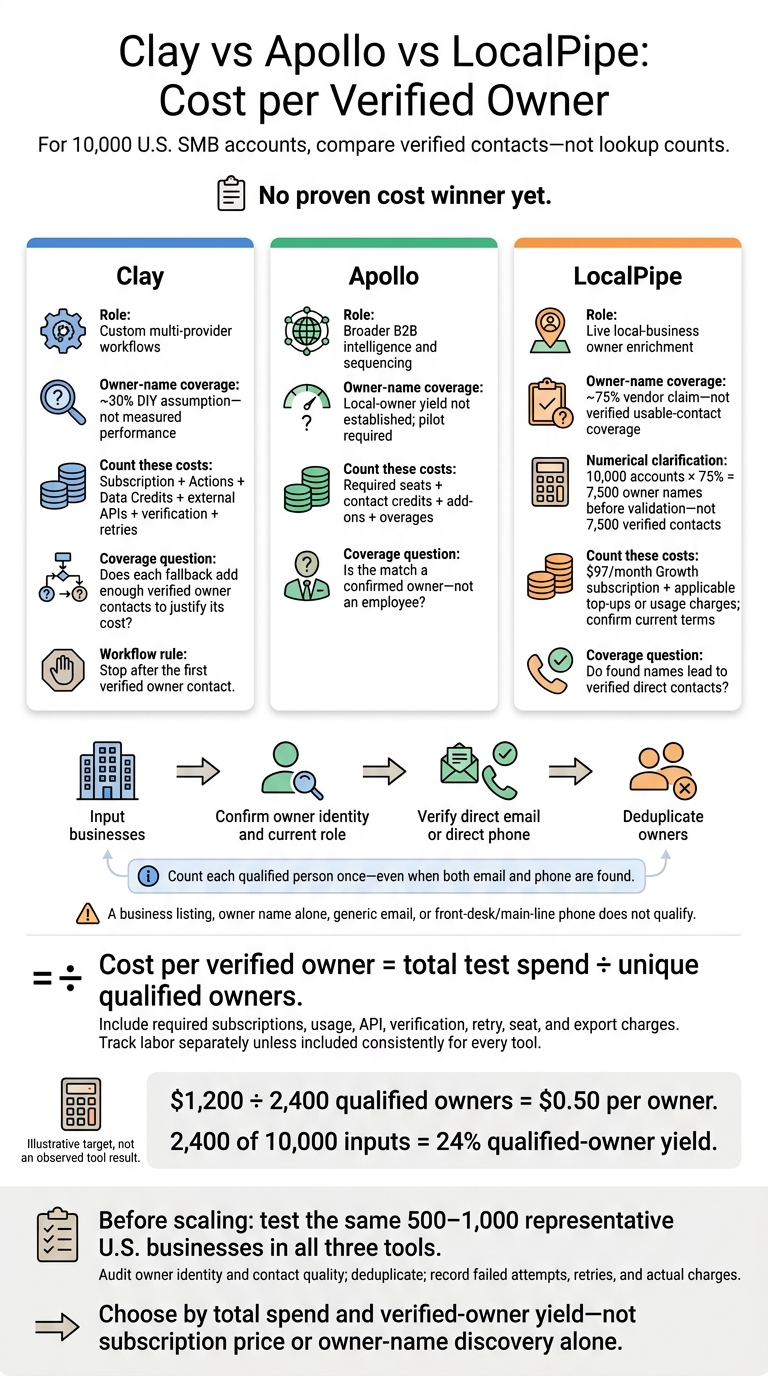
Clay vs Apollo vs LocalPipe: Cost per Verified Owner
Clay: The Cost of a DIY Owner-Enrichment Workflow
Clay is a workflow orchestration tool, not an owner database. It routes records through multiple providers, AI research, validation rules, and exports.[3][5]
Compare Basic Lookups with a Multi-Provider Waterfall
A basic Clay workflow includes one company-resolution step, one owner-enrichment provider, and verification. It should also enrich local business data to filter out generic emails and front-desk numbers.
A multi-provider waterfall adds providers, AI research for unresolved records, and retries for temporary failures. Stop after the first verified owner contact. Running every provider on every row just adds cost. Your cost per qualified owner depends on how you build the workflow - not just how many records you process.
The table below is an illustrative sensitivity model, not a Clay quote. Both workflows assume a 30% owner-name match rate. The waterfall improves contact recovery, not owner-name discovery.[3][5]
| Metric | Basic lookup workflow | Multi-provider waterfall |
|---|---|---|
| Input accounts | 10,000 | 10,000 |
| Assumed owner-name matches | 3,000 | 3,000 |
| Verified-contact rate among matched owners | 55% | 72% |
| Qualified owner contacts | 1,650 | 2,160 |
| Data Credits | Measure provider and verification usage | Measure providers, AI, verification, and retries |
| Actions | Record charged executions | Record charged executions, including fallbacks |
| External provider bills | Add invoices for connected API keys | Add provider and AI/API invoices |
| Clay subscription | Include required plan; price not shown | Include required plan; price not shown |
| Assumed all-in spend, including applicable costs above | $1,650 | $2,700 |
| Cost per qualified owner | $1.00 | $1.25 |
Count Data Credits, Actions, and External API Costs
Clay bills orchestration Actions separately from marketplace Data Credits. Costs depend on the provider, task, and plan. According to Clay’s docs, empty enrichments incur no Data Credits or Actions in some cases. Still, check how failed calls and retries are billed.[2][8]
Don’t budget around a universal “6–20 credits per record” estimate. Use current Clay pricing and your exact provider setup.[3][5] Bringing your own API keys avoids Clay Data Credits for those calls, but Clay Actions and provider fees still apply.[5][6] Apollo, by comparison, uses a database model with a different cost structure.
When Clay's Custom Workflows Justify the Setup
Clay offers flexible workflows with variable costs, compared with Apollo’s database model or LocalPipe’s live local enrichment. Reusable routing, custom ownership checks, existing API subscriptions, and CRM delivery can make the setup and maintenance worth the effort.
For local-owner lists, pair LocalPipe for enrichment with Clay for routing and fallbacks.[1] Count LocalPipe’s successful-find charges, both subscriptions, Clay usage, and any extra providers. Use the combined stack only if it adds enough qualified contacts or saves enough manual work to justify the cost. That’s the tradeoff to weigh against Apollo’s simpler database pricing.
sbb-itb-3041e27
Apollo: The Cost of Finding Local Owners in a B2B Database
Measure Owner Contacts, Not Just Company Matches
Apollo is a broad B2B database, not a local-owner lookup tool.[4][9] Apply the qualified-owner rule defined above and run a pilot before projecting results for 10,000 accounts. A company match is not a qualified owner.
Without a controlled Apollo pilot, leave measured results blank. Don’t assign an unsupported match rate. Model the full workload separately, since seat, credit, and overage costs may not scale directly with volume.
| Metric | Pilot | Projected: 10,000 accounts |
|---|---|---|
| Matched businesses | Not supplied | 10,000 × observed business-match rate |
| Confirmed owners or principals | Not supplied | 10,000 × observed owner-match rate |
| Verified owner emails | Not supplied | 10,000 × observed qualified-email rate |
| Direct owner phones | Not supplied | 10,000 × observed direct-phone rate |
| Qualified owners, counted once each | Not supplied | Count each owner once; do not add email and phone totals. |
| Total charges | Actual invoice and usage details needed | Seat fees + used credit charges + add-ons + overages |
| Cost per qualified owner | Actual charges ÷ qualified owners | Modeled total charges ÷ projected qualified owners |
The next cost to check is Apollo’s seat and credit structure.
Count Seats, Contact Reveals, and Credit Limits
Apollo’s public pricing with annual billing has been listed at about $49/user/month for Basic, $79 for Professional, and $119 for Organization. Organization requires three users.[11] At publication, recheck prices, minimum seats, included credits, export permissions, and billing commitments. Keep verified prices separate from modeled usage charges.
Unused credits expire at the end of the billing cycle. Recurring add-on credits are billed immediately and aren’t prorated.[12]
Apollo’s documentation says accessing a verified email or verified mobile number for a new prospect consumes a credit.[13][14] An office phone paired with an email still doesn’t qualify if it’s only a main line.[14]
Log retries, duplicate reveals, failed searches, and disqualified contacts, then verify how Apollo bills each. Eligible verified-email bounces may receive credit refunds when sent through Apollo within 30 days. Mobile credits aren’t refundable.[14]
Whether those costs make sense depends on how many qualified owners Apollo delivers.
When Apollo Is the Better Fit
Apollo fits broader B2B lists that need professional titles and sequencing tools.[10][11] For local SMBs, judge it by net qualified-owner yield - not company-match count. Compare that yield with LocalPipe’s ability to find business owner emails from Google Maps via dedicated live owner enrichment.
LocalPipe: The Cost of Live Local-Owner Enrichment
Distinguish Live Business Records from Verified Owner Contacts
LocalPipe enriches Google Maps businesses on demand through live public sources. Treat each output separately: business exports, owner names, business emails, owner emails, and direct owner phones. A business listing or an info@ address doesn’t count as a verified owner contact. This comparison measures verified owner contacts - not raw business records.
LocalPipe’s materials claim about 75% owner-name discovery, triple-verified email checks, and a bounce rate below 1%. Across 10,000 accounts, that translates to 7,500 owner names before validation - not 7,500 verified contacts. Results can vary by industry, geography, business size, how recently sources were updated, and starting-list quality.
Calculate Successful-Find Charges for 10,000 Accounts
LocalPipe’s Growth plan costs $97/month and includes 5,000 credits, 3,500 owner names, and 10,000 business exports. Usage-Based starts at $97/month plus usage.
Before pricing a 10,000-account test, confirm overage billing, included exports, current top-up prices, what counts as a billable success, and how retries are billed. Owner emails cost 2 credits. Phone pricing materials list both 4 and 5 credits, so confirm the rate before calculating total spend. Apply those billing terms to the table below.
| Field | Successful finds | Credit or usage rate, including retry treatment | Credits consumed | Allocated subscription cost | Field-level cost |
|---|---|---|---|---|---|
| Owner names | Number found; not supplied | Included allowance or usage-based rate; confirm name charges and retry billing | Confirm whether name finds use enrichment credits | Name allocation; state the method | Name allocation + confirmed name charges |
| Owner emails | Number found; not supplied | 2 credits on fixed plans; confirm whether retries are charged once | 2 × owner emails found | Email allocation, by credit share | Email allocation + email top-ups or usage charges |
| Direct owner phones | Number found; not supplied | 4 or 5 credits; confirm rate and duplicate/retry billing | Confirmed phone rate × direct owner phones found | Phone allocation, by credit share | Phone allocation + phone top-ups or usage charges |
| Unique qualified owners | Owner emails found + direct owner phones found − overlap, after owner validation and deduplication | Not a separately billed field | Don’t count field totals as separate owners | Allocations must total $97 if this test bears the full subscription | Total test spend ÷ unique qualified owners |
Charge the full $97 Growth subscription to this test. The $0.0194-per-credit figure is only a shortcut for allocating that cost. Use cost per verified owner, rather than credit volume, for the final comparison.
When LocalPipe Fits - and When Another Tool Fits Better
LocalPipe suits local outreach when you need named owners, direct contacts, and success-based billing. Apollo and ZoomInfo suit broader B2B org-chart work; Outscraper and Apify suit raw listing extraction; and Clay suits custom routing. For owner-level prospect lists, confirm each person’s current role and test contact quality before scaling.
Conclusion: Compare Total Spend, Coverage, and Cost per Owner
No tool wins outright based on current evidence. Compare cost per verified owner - not just subscription price.
These variables determine what you’ll pay per owner.
| Metric | Clay | Apollo | LocalPipe |
|---|---|---|---|
| Role | DIY workflow | Broad B2B database | Live local enrichment |
| Input accounts | 10,000 | 10,000 | 10,000 |
| Owner-name match rate | ~30% DIY assumption | Not established | ~75% vendor claim; not verified as usable-contact coverage |
| Verified direct-contact rate among matched owners | Not established | Not established | Not established |
| Deduplicated qualified owners | Measure in the pilot | Measure in the pilot | Measure in the pilot |
| Subscription | Launch starts at $185/month [3] | Confirm current plan and seat minimums | $97/month Growth; confirm current rate card |
| Additional charges | Data Credits, Actions, APIs, verification, and retries; top-ups carry a 30% premium [3][7] | Verified email and phone credits; phone billed separately [15] | Success-based billing; confirm retries, duplicates, and phone rates |
| Cost per qualified owner | All-in spend ÷ qualified owners | All-in spend ÷ qualified owners | All-in spend ÷ qualified owners |
| Verification caveat | Separate basic lookup and waterfall results | Company or employee matches aren’t owner matches | Names and business emails aren’t verified owner contacts |
All-in spend should include subscription, usage, API, verification, retry, and required seat or export charges. Track labor separately unless you include it in every tool’s total.
Show How Contact Coverage Changes the Cost
Coverage matters more than sticker price. Use formulas to compare costs because each tool’s total depends on its workflow and billing model.
Illustrative sensitivity model - not predicted vendor performance. Qualified owners = 10,000 × name-match rate × usable-contact rate × deduplication factor.
Scenario Name-match rate Usable-contact rate among matched owners Deduplication factor Qualified owners Clay cost/owner Apollo cost/owner LocalPipe cost/owner Lower 30% 20% 90% 540 C_low ÷ 540 A_low ÷ 540 L_low ÷ 540 Base 40% 40% 95% 1,520 C_base ÷ 1,520 A_base ÷ 1,520 L_base ÷ 1,520 Higher 50% 60% 98% 2,940 C_high ÷ 2,940 A_high ÷ 2,940 L_high ÷ 2,940 C, A, and L represent each tool’s all-in spend for that scenario.
At $0.50 per qualified owner, every 1,000 qualified owners costs $500. A $1,200 run needs 2,400 qualified owners, or 24% of inputs, to match that benchmark.
Retries, duplicate charges, and seat minimums can shift those thresholds. A 75% versus 30% name-discovery rate alone doesn’t settle the comparison.
Compare Other Tools by Task
If these three tools don’t fit your job, compare the task-specific alternatives below.
| Task | Tools | Appropriate role |
|---|---|---|
| Business-list collection and automation | Outscraper, Apify, Scrap.io, PhantomBuster | Extract listings or automate supported collection workflows |
| Local prospect discovery | D7 Lead Finder, LeadSwift | Build local business lead lists faster |
| Broad B2B intelligence | ZoomInfo, Cognism | Research corporate accounts and contacts |
| Contact discovery and verification | Lusha, Seamless.ai, UpLead, Hunter | Find B2B contacts or discover and verify emails; test local-owner coverage separately |
Extracting a listing doesn’t prove ownership or verified contact coverage. Apply the same checks to every tool: confirm the person’s identity, connection to the business, and usable contact details.
Choose the Tool That Fits Your Prospect List
Match the tool to the list you’re building. Before processing 10,000+ accounts, test the same 500–1,000 accounts across representative U.S. categories and regions. Audit a random sample, deduplicate by business and person, and record failed attempts and retries.
Use that pilot to test LocalPipe for local-owner outreach, Clay for custom multi-provider workflows, and Apollo for broader B2B intelligence and sequencing.
FAQs
How can I confirm someone is the current owner?
Cross-check current Secretary of State filings against the business’s website and social media. Don’t rely only on static databases or LinkedIn profiles - many SMB owners don’t have a LinkedIn profile.
LocalPipe uses live enrichment to find owner names, with an approximately 75% find rate, compared with approximately 30% for DIY Clay workflows. Separately, triple email verification helps keep bounce rates below 1%. It checks email deliverability, not ownership.
How should I count owners with multiple businesses?
Count each separate business listing, not each owner. If one person owns multiple businesses or locations, treat every distinct listing as its own outreach opportunity. That way, your coverage reflects all target accounts.
Identify the specific decision-maker for each record. Tools like LocalPipe link owner contact data to a particular listing, so the same person may appear in multiple business records.
When is extra enrichment worth the added cost?
Extra enrichment is worth paying for when owner identification and verified contact details lower your total cost per successfully reached owner. Raw scrapers like Outscraper or Apify provide business listings, but those listings typically need more enrichment before you can contact owners.
LocalPipe’s pay-on-find model and roughly 75% owner-identification rate can cost less per owner reached than DIY Clay workflows, where service fees and lower match rates drive up costs.